Topicary vs Adobe FrameMaker
Adobe FrameMaker is a Windows desktop application for authoring and composing long technical documents, in production since 1986. Topicary is a cloud component content management system that runs in any browser. Both handle structured authoring and content reuse. The overlap is real. The difference is shape. FrameMaker composes books and prints them. Topicary manages components and publishes them to the web.
FrameMaker earns its place on print-production work. Consider a 500-page manual with auto-numbered chapters, a generated index, and page-number cross-references. Few tools match it. The friction sits elsewhere. Every author needs a Windows install and a paid Adobe seat. Collaboration runs through source control instead of live co-editing. Hosted web output means a handoff to RoboHelp or a licensed Publishing Server. This page covers where each tool fits and what a move looks like.
At a glance
Platform
Topicary
Any browser, any OSAdobe FrameMaker
Windows desktop onlyPricing model
Topicary
Flat published: $0 / $79 / $149 per monthAdobe FrameMaker
Per-seat Adobe subscription (former perpetual)Time to productive
Topicary
Same day, works like NotionAdobe FrameMaker
Weeks: structured-authoring and DTP trainingCollaboration
Topicary
Real-time co-editing, track changes, presenceAdobe FrameMaker
File-based, one author per documentPublishing
Topicary
Hosted site, publish and it is liveAdobe FrameMaker
Local build; hosting via RoboHelp or Publishing ServerPrint PDF engine
Topicary
Print-optimized: cover, TOC, running headersAdobe FrameMaker
Full composition: auto-numbering, index, master pagesStructured DITA depth
Topicary
DITA import and export; block modelAdobe FrameMaker
Native structured FrameMaker with mature DITA authoringOffline
Topicary
Cloud-only, needs internetAdobe FrameMaker
Full offline desktop appFilled marker = leads this capability. Even rows are unmarked.
Desktop composition vs cloud authoring
FrameMaker is desktop publishing software with a technical-writing pedigree. Content lives in FrameMaker documents (.fm) assembled into books, or in structured DITA/XML files. Authors format through paragraph and character catalogs. The output engine turns that source into print-ready PDF. Its control over page composition is something browser tools do not attempt. That is the strength, and it is a genuine one.
Topicary is built for the opposite default. Content lives in a cloud repository as structured blocks. Authors work in a browser editor that behaves like Notion. Multiple people edit the same topic at once with live cursors. Publishing a hosted site takes seconds with no local build. The trade is deliberate. Topicary gives up prepress-grade print composition to gain cloud collaboration, hosted output, and content-health automation. FrameMaker makes the reverse trade.
The practical dividing line is your primary deliverable. Teams whose main output is a printed or PDF manual at book scale are FrameMaker's core audience. Teams whose main output is a hosted documentation site are pulling toward cloud tools. Those sites are read on the web and increasingly by AI assistants. Most escapees do not leave because FrameMaker is weak at print. Print simply stopped being their main deliverable. The desktop overhead now buys them less than it costs.
Feature comparison
Content model
Topicary
Structured block model stored in the cloudAdobe FrameMaker
Unstructured FrameMaker documents or structured DITA/XMLEditor
Topicary
Browser block editor: slash commands, floating toolbarAdobe FrameMaker
Desktop DTP editor with paragraph and character catalogsContent reuse
Topicary
Reusable components with where-used tracking and orphan detectionAdobe FrameMaker
Text insets, variables, and conditional text across a bookConditional content
Topicary
Boolean AND/OR/NOT via visual builder, in-editor previewAdobe FrameMaker
Conditional text tags applied at document and book levelVariables
Topicary
Key-value text with per-target overridesAdobe FrameMaker
User variables and system variables, running-header markersPrint PDF output
Topicary
Print-optimized: cover, TOC with dot leaders, running headers, fontsAdobe FrameMaker
Book building: master pages, auto-numbering, index, cross-ref page numbersWeb publishing
Topicary
Hosted sites: dark mode, full-text and AI search, custom CSSAdobe FrameMaker
Responsive HTML5 via RoboHelp handoff or Publishing ServerHosting
Topicary
Included and managedAdobe FrameMaker
Self-host or FrameMaker Publishing ServerImport
Topicary
Markdown, HTML, DITA, Confluence, Flare, Word, OpenAPI (7)Adobe FrameMaker
MIF, XML/DITA, Word, unstructured to structured conversionReal-time collaboration
Topicary
Live co-editing, cursors, presence, track changesAdobe FrameMaker
None: single-author files, source control for versioningAI authoring
Topicary
Inline AI: draft, rewrite, expand, summarize, improveAdobe FrameMaker
No built-in AI authoringLLM-ready output
Topicary
llms.txt, llms-full.txt, .md URLs, AI query endpoint, automaticAdobe FrameMaker
No built-in LLM-ready outputSME review
Topicary
Token-based link, no login, inline comments, approve/rejectAdobe FrameMaker
PDF review via Acrobat, reconciled back into the sourceContent health
Topicary
Stale-page, orphan, and broken-reference detectionAdobe FrameMaker
No automated content-health checksOffline
Topicary
Cloud-only, requires internetAdobe FrameMaker
Full offline capabilityFilled marker = leads this capability. Even rows are unmarked.
The deep dives below cover where each tool leads, and the trade-offs behind every marker above.
What FrameMaker does better
Three areas where FrameMaker has depth Topicary does not attempt to match.
Print-production PDF at book scale
FrameMaker's print engine composes numbered, indexed, cross-referenced books that browser-first tools do not produce.
FrameMaker was designed around the printed and PDF manual. Its composition engine reflects decades of that focus. Chapter and figure numbering generates automatically and resets per chapter. Back-of-book indexes build from scattered index markers. Cross-references resolve to live page numbers. Master pages control running headers, footers, and page regions. Book building assembles dozens of chapter files into one continuously numbered deliverable. For aerospace, defense, medical-device, and other regulated print documentation, that is the daily requirement.
Topicary produces print-optimized PDFs with branded covers, a table of contents with dot leaders and page numbers, running headers, and custom fonts. It does not auto-number chapters and figures. It generates no back-of-book indexes, no page-number cross-references, and no master-page layouts. For internal review PDFs and product guides, that output is enough. For a 500-page regulatory manual with a generated index, FrameMaker has depth Topicary does not.
Mature structured DITA authoring
FrameMaker has a long, battle-tested structured-authoring path tied to Adobe's publishing stack.
FrameMaker supports unstructured documents and structured authoring against DITA and custom XML schemas. That structured path carries years of production hardening. Teams with an existing DITA information architecture, a FrameMaker Publishing Server pipeline, and established EDD or schema rules have real depth invested there. FrameMaker validates against the schema and enforces element rules as authors type. It drives multi-channel output from that structured source. If your DITA workflow already runs on FrameMaker, that maturity deserves respect before you move.
Offline desktop authoring
FrameMaker runs fully offline as a local application; Topicary needs a connection.
FrameMaker installs on the machine and runs without a network. No service dependency. No outage risk. No data leaves the workstation until you choose to publish. Offline authoring is a hard requirement in air-gapped defense environments, on aircraft, and in regions with unreliable connectivity. No cloud tool can meet it. Topicary is cloud-only. It auto-saves and queues edits locally, but browsing, publishing, and review need connectivity. Where offline is non-negotiable, FrameMaker keeps the advantage.
Where Topicary pulls ahead
No install and no desktop-publishing learning curve
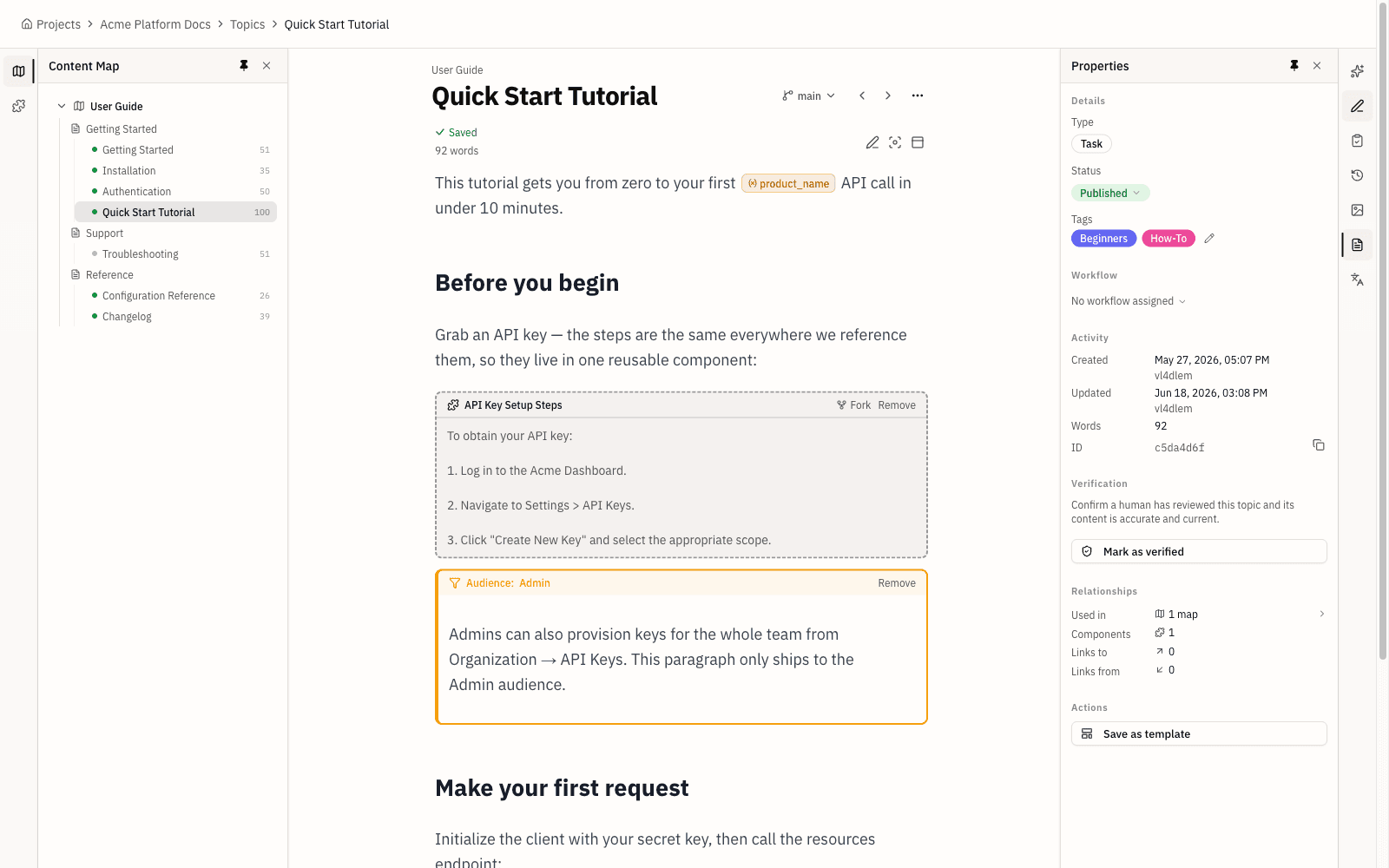
Topicary opens in a browser and feels familiar in minutes; FrameMaker asks authors to learn desktop-publishing concepts first.
Topicary runs in any browser on any operating system, so a Mac or Linux author needs no Parallels install and no Windows machine. Writers who know Notion, Google Docs, or Confluence recognize the slash-command editor and floating toolbar right away. FrameMaker asks new authors to learn paragraph and character catalogs, reference and master pages, variables, and conditional text. Structured work adds the element hierarchy of a DITA schema. That is power for a trained specialist. It is a wall for an occasional contributor or a subject-matter expert who writes twice a year.
Hosted publishing and real-time collaboration
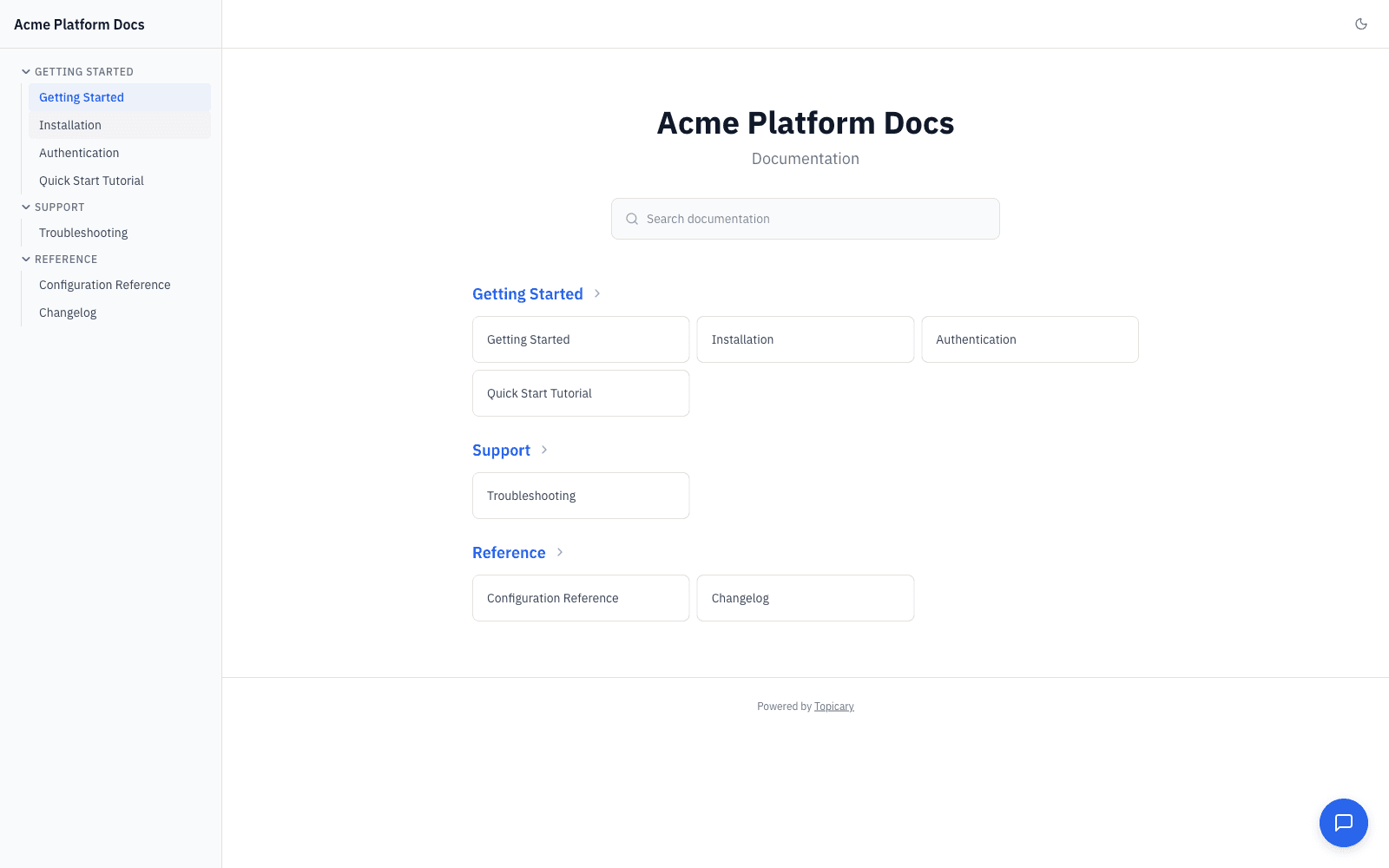
Topicary publishes a live hosted site and lets multiple writers edit at once; FrameMaker builds locally and edits one author per file.
Publishing in Topicary is one step. Press publish and the hosted site is live, with full-text search, an AI chat widget, dark mode, and a custom domain. FrameMaker's web story is a handoff. Responsive HTML5 output typically runs through RoboHelp or a licensed FrameMaker Publishing Server. That is infrastructure to buy, run, and maintain. Collaboration is the same contrast. FrameMaker uses a single-author-per-file model with source control for versioning. Topicary supports live co-editing with cursors, presence, and track changes, so two writers work the same topic without merge conflicts. For a 3-person team without a dedicated tooling admin, that difference decides the week.
Content health and LLM-ready output
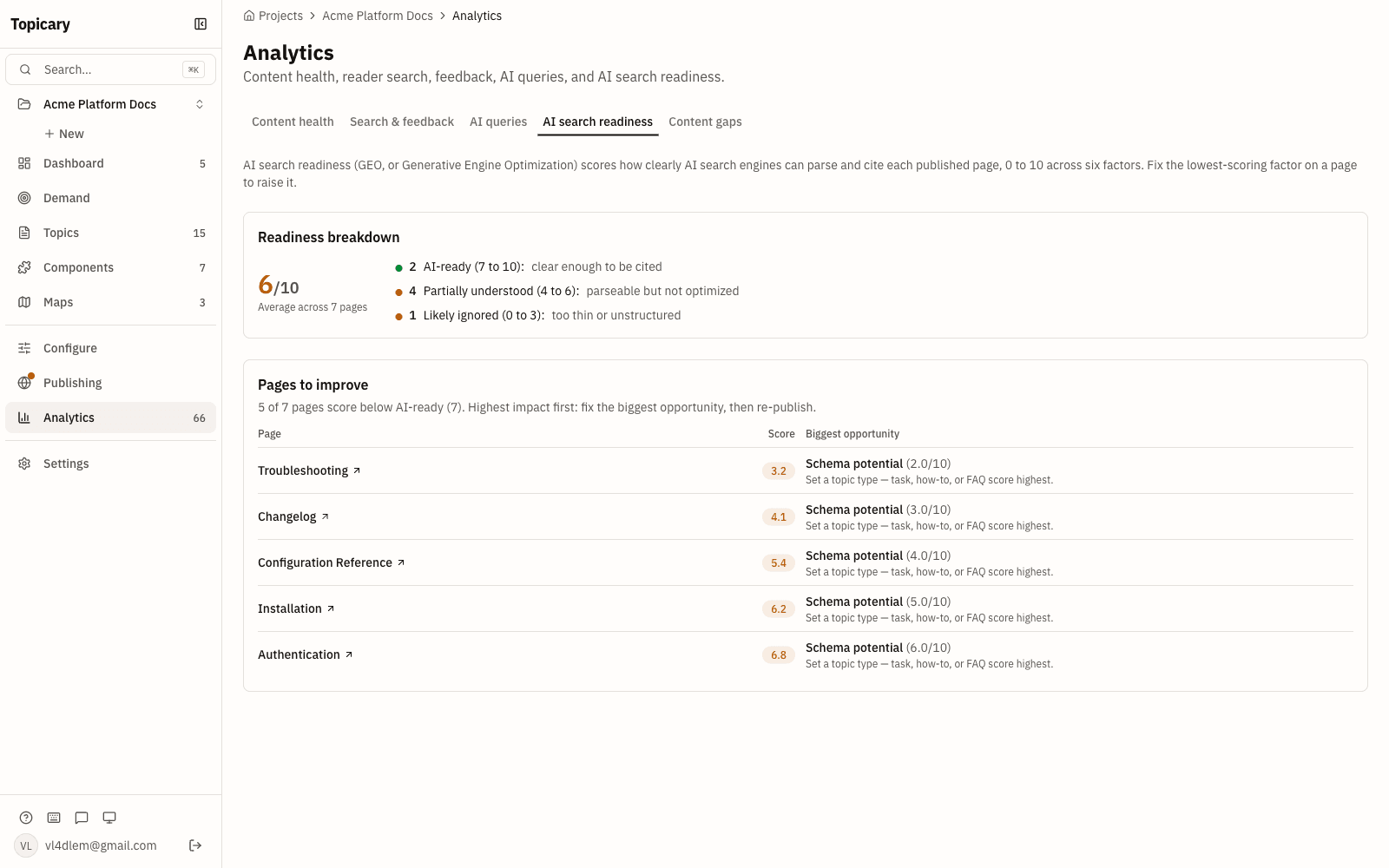
Topicary watches for decay and ships AI-ready output automatically; FrameMaker offers neither.
Topicary flags stale topics, orphaned components, and broken references without being asked. It turns "are the docs okay" into a number a solo writer can watch. Every published site also generates llms.txt, llms-full.txt, clean .md URLs for each page, and an AI query endpoint. Assistants retrieve and cite that content cleanly. This matters more each quarter. GitBook reported that AI systems grew from under 10% of documentation reads in January 2025 to 41% by December 2025. Source: GitBook AI docs data, checked July 2026. FrameMaker has no built-in content-health checks and no built-in LLM-ready output. It was built to produce print, not to be read by a crawler.
Who should stay on FrameMaker, and who should move
The primary deliverable is the single factor that decides this, more than any feature row above.
The clearest signal to stay is a print-first mandate. A regulator, a customer contract, or an established process may require a numbered, indexed PDF manual. FrameMaker is the primary tool for that job. A cloud CCMS does not replace it. The single biggest reason teams stay is an existing DITA workflow already wired into FrameMaker Publishing Server. Unwinding that pipeline usually costs more than the desktop overhead it carries. Offline or air-gapped authoring is the other clear reason to keep FrameMaker. No browser tool can meet a no-network requirement.
The clearest signal to move is a shift in what readers actually consume. The printed manual becomes a rarely-opened artifact. The hosted site becomes the main way people and AI assistants reach the content. At that point the desktop model charges for depth the team no longer uses. Collaboration is the second signal. The moment two writers need the same document at once, a file-based tool with source control turns routine edits into merge work. Cost is the third. A per-seat Adobe subscription for occasional contributors is hard to justify when a subject-matter expert writes twice a year. Pilot a cloud CCMS on one real project before committing. That measures the trade against your own content instead of a feature table.
A middle path exists and is common in practice. Keep FrameMaker for the one or two deliverables that truly need print composition. Move everything else to a cloud tool. Nothing requires forcing every document through a desktop pipeline built for manuals. Split the work by deliverable rather than by tool loyalty. That tends to lower both cost and friction.
Migration path
Moving off FrameMaker runs through an intermediate format, because Topicary has no native .fm importer. The route depends on whether your source is structured or unstructured.
Structured FrameMaker (DITA/XML) is the cleaner path. Export to DITA, then import the DITA into Topicary. Topicary maps concepts, tasks, references, and maps into topics and hierarchy. It converts content references into component references. Review element mappings, tables, and any specialization that has no direct equivalent.
Unstructured FrameMaker documents convert through Word or a MIF-to-XML step first. Export each document, import it, then rebuild heading structure, tables, and conditional text in Topicary. Print-specific constructs do not carry over. That covers master pages, book-level auto-numbering, generated indexes, page-number cross-references, and running-header markers. Re-express them as hosted output, or drop them if print is no longer the deliverable.
The review phase is where the real work sits. Walk each imported topic and check four things. Heading levels must survive the round-trip. Tables must keep their column structure. Conditional text must arrive as Topicary conditions rather than inline markup. Cross-references must point at topic links instead of page numbers. Rebuild the publishing target next. Print targets and hosted-site targets are different objects. A FrameMaker book maps to a Topicary map with a web target. The print-only settings (page size, master pages, running-header markers) have no equivalent to carry over. Reconnect reuse last. Convert repeated text insets into components, then verify that where-used tracking picks them up. That order keeps structure decisions ahead of styling decisions, and that sequence avoids the most rework.
Budget for a review phase rather than a one-click import. For a mid-sized book, plan two to three days to verify structure, reconnect reuse, and set up the publishing target. For a broader move, the MadCap Flare comparison and the Adobe RoboHelp comparison cover the two tools FrameMaker users compare it with most. The help authoring tools roundup puts all seven options side by side. For the structured-authoring model itself, see structured authoring without XML and the DITA alternative guide.
Disclosure: This page is published by Topicary. I compete with Adobe FrameMaker. FrameMaker claims here are limited to durable architectural facts and cite Adobe's official pages. If you find an error, email support@topicary.com and I will correct it within 24 hours.