Topicary vs Paligo
Both tools support structured authoring with component reuse, conditions, variables, content branching with merge, release management, translation, and multi-channel publishing. Paligo offers deeper branch management, more TMS integrations (6 vs 1), and XSL-FO PDF with prepress control. The price sits behind a sales call.
Topicary covers topic branching with three-way merge, release lifecycle, and XLIFF translation with Phrase TMS on the Business plan, priced on request. Track changes and approval workflows come with Team at $149/month. Component reuse and conditions come with every plan, Free included. The editor requires no XML knowledge.
At a glance
Content model
Topicary
JSON-based block model, no XMLPaligo
DocBook XML with schema validationPrice (5 writers)
Topicary
$1,788/yr (Team plan, reuse and conditions included)Paligo
From $15,000/yr (Vendr median ~$32,680)Editor
Topicary
Block editor: slash commands, bubble toolbarPaligo
Visual editor over DocBook with element constraintsPDF engine
Topicary
Print-ready: cover, TOC, headers, no auto-numberingPaligo
XSL-FO: auto-numbering, prepress, per-page-type layoutTranslation
Topicary
Phrase TMS + XLIFF 2.0 round-tripPaligo
6 TMS integrations + AI translationReuse depth
Topicary
Where-used tracking, orphan detection (block-level)Paligo
Component forking, scoped filtering, inline fragmentsBranching
Topicary
Topic branching, 3-way merge, release lifecycle, versioningPaligo
Publication-level branches, component forking, 5-state lifecycleLLM-ready
Topicary
llms.txt, .md URLs, ?ask= endpoint, MCP server, all automaticPaligo
No built-in supportFilled marker = leads this capability. Even rows are unmarked.
2 cloud CCMS tools, different foundations
Paligo: DocBook XML
- Content stored as DocBook XML, a 30-year documentation standard
- The visual editor hides the XML. DocBook's element hierarchy still decides what goes where
- Schema validation enforces consistent structure. Content exports as portable XML
- New authors must learn which elements are valid in which contexts
Topicary: structured JSON
- Content stored as structured JSON, the same foundation as Notion, Outline, and other modern editors
- Slash commands, floating toolbar, keyboard shortcuts, with no element hierarchy to learn
- No schema validation, but 10 built-in content validation rules (broken references, heading hierarchy, missing alt text, and more)
A team of 3 to 5 writers who already know Markdown and Google Docs finds Topicary familiar on day one. Paligo's architecture matters to a different team. That team needs DocBook compliance, or trades content with XML-based systems. If you are still exploring what a CCMS is, start there before comparing products.
Paligo has announced a next-generation editor built on the same modern editing framework Topicary uses. The announcement concedes the editing gap. That gap runs past features. Comfort at the keyboard depends on the readability of the writing surface itself. Moving from DocBook-native to a block editor without breaking backward compatibility is a multi-year project.
Feature comparison
Content model
Topicary
JSON block model + 10 built-in validation rulesPaligo
DocBook XML with schema validation; Schematron on EnterpriseEditor
Topicary
Block editor: slash commands, bubble toolbar, no XML viewPaligo
Visual editor over DocBook; valid-element constraints at cursorBlock-level reuse
Topicary
Reusable components, where-used tracking, orphan detectionPaligo
Topics and components with where-used trackingInline reuse
Topicary
Inline components for phrase-level reuse inside a paragraphPaligo
Sentence-level fragments, component forking, scoped filteringConditions
Topicary
Dimensions with per-block include/exclude, in-editor previewPaligo
7+ profiling attributes plus scoped filtering by map positionVariables
Topicary
Key-value text with per-target overridesPaligo
4 types (text, translatable, image, XML) plus dynamic textContent branching
Topicary
Topic branching, 3-way merge, release lifecycle, versioningPaligo
Publication branches, topic forks, 3-way merge, 5-state lifecyclePublishing
Topicary
Hosted web, PDF, Word, Markdown/DITA export, no SCORMPaligo
PDF (XSL-FO), HTML5, Word, SCORM; direct publish to Zendesk/SFHosting
Topicary
Built-in hosted sites: dark mode, AI search, feedback, no third partyPaligo
Netlify-based hosting or Content Delivery Portal (add-on)Translation
Topicary
XLIFF 2.0 round-trip, Phrase TMS, per-target localePaligo
6 TMS integrations, AI translation in 30+ languagesReview
Topicary
Token-based SME review (no login), track changes, workflowsPaligo
Reviewer/contributor roles; reviewers need accountsImport
Topicary
Markdown, HTML, DITA, Confluence, Flare, Word, OpenAPI (7)Paligo
HTML, DocBook, DITA, Word, Markdown, Confluence, Flare, Zendesk, OpenAPIAI
Topicary
Claude assistant (draft/rewrite/expand) + AI search on published sitesPaligo
OpenAI assistant (requires AI Addendum) + token-based AI translationLLM-ready
Topicary
llms.txt, .md URLs, sitemap.md, ?ask= endpoint, MCP server, all automaticPaligo
No built-in support; published sites are HTML-onlySSO/SAML
Topicary
SAML 2.0 on the Business planPaligo
Enterprise plan onlyFilled marker = leads this capability. Even rows are unmarked.
The deep dives below cover where each tool leads, and the trade-offs behind every marker above.
What Paligo does better
4 areas where Paligo has genuine depth beyond what Topicary offers.
Branch management depth
Both do 3-way merge and a release lifecycle. Paligo goes deeper with publication-level branches and component forking.
Both tools now support content branching with three-way merge and release lifecycle management. The difference is scope:
| Paligo | Topicary | |
|---|---|---|
| Branch level | Publication-level (branches apply to entire maps) | Topic-level (branches apply to individual topics) |
| Merge | 3-way with color-coded source/target/merged view | 3-way with conflict resolution dialog |
| Forking | Component forking with optional merge-back | No component forking |
| Release lifecycle | 5-state with content locking at "Released" | Draft/published/archived with comparison dashboard |
| Version publishing | Named versions with automatic archiving | Publication versioning with reader-facing version switcher |
Paligo's branch management is deeper. That matters for publication-level branches, component forking, or granular merge workflows across large documentation sets.
Translation management
Paligo's multiple TMS integrations and built-in AI translation outnumber Topicary's single Phrase connection.
| Paligo | Topicary | |
|---|---|---|
| TMS integrations | Crowdin, Phrase, Smartcat, LanguageWire, and more | 1: Phrase |
| AI translation | 30+ languages | Not included |
| Side-by-side editing | Source and translation in parallel | Not available |
| Languages | Business: 2 included; more by quote | Unlimited on the Business plan |
Paligo's translation depth is greater. It pays off if your team works across multiple TMS vendors, or wants AI-assisted translation as a first pass.
Reuse granularity and variable depth
Paligo reuses down to the sentence with forking, scoped filtering, and 4 variable types, though heavy reuse can turn into "spaghetti."
Paligo's reuse reaches inside paragraphs. Individual sentences, list items, and figure captions can be reused as linked text fragments across topics. It also supports:
- Component forking: editable copies that break the reuse link, with optional merge-back
- Scoped filtering: same reused topic filtered differently by position in the map hierarchy
- 4 variable types: plain text, translatable, image, XML (with markup and links), plus dynamic text and per-instance overrides
Topicary reuses at the block and component level with where-used tracking. Inline components cover phrase-level reuse inside a paragraph. It does not yet have forking, scoped filtering, or non-text variable types. Paligo has its own floor here. One r/technicalwriting user named "the inability to have word or character level reusable content" as a limitation (reddit). Paligo's fragments work at sentence level, not word level.
Paligo users report that deep reuse creates its own problems:
- "Spaghetti reuse": tangled relationships that make tracking difficult
- New users frequently confuse fork and reuse
- Published output with heavily reused content can take 10 to 20 minutes to render
PDF output depth
Paligo's XSL-FO Layout Editor adds auto-numbering, per-page-type layout, and prepress that Topicary's print-ready PDF does not match.
Paligo's PDF engine uses XSL-FO (Apache FOP or RenderX XEP). The Layout Editor provides 15 or more configuration categories:
- Page types: front, back, TOC, chapter opener, normal, each with different headers/footers
- Auto-numbering: chapters and sections (1.1, 1.2, 2.1)
- Typography: heading styles for levels 1 to 6, 5 table variants, code blocks, admonitions
- Running headers/footers: dynamic content (current chapter, page number, publication title)
- Prepress: crop marks, bleeds, watermarks
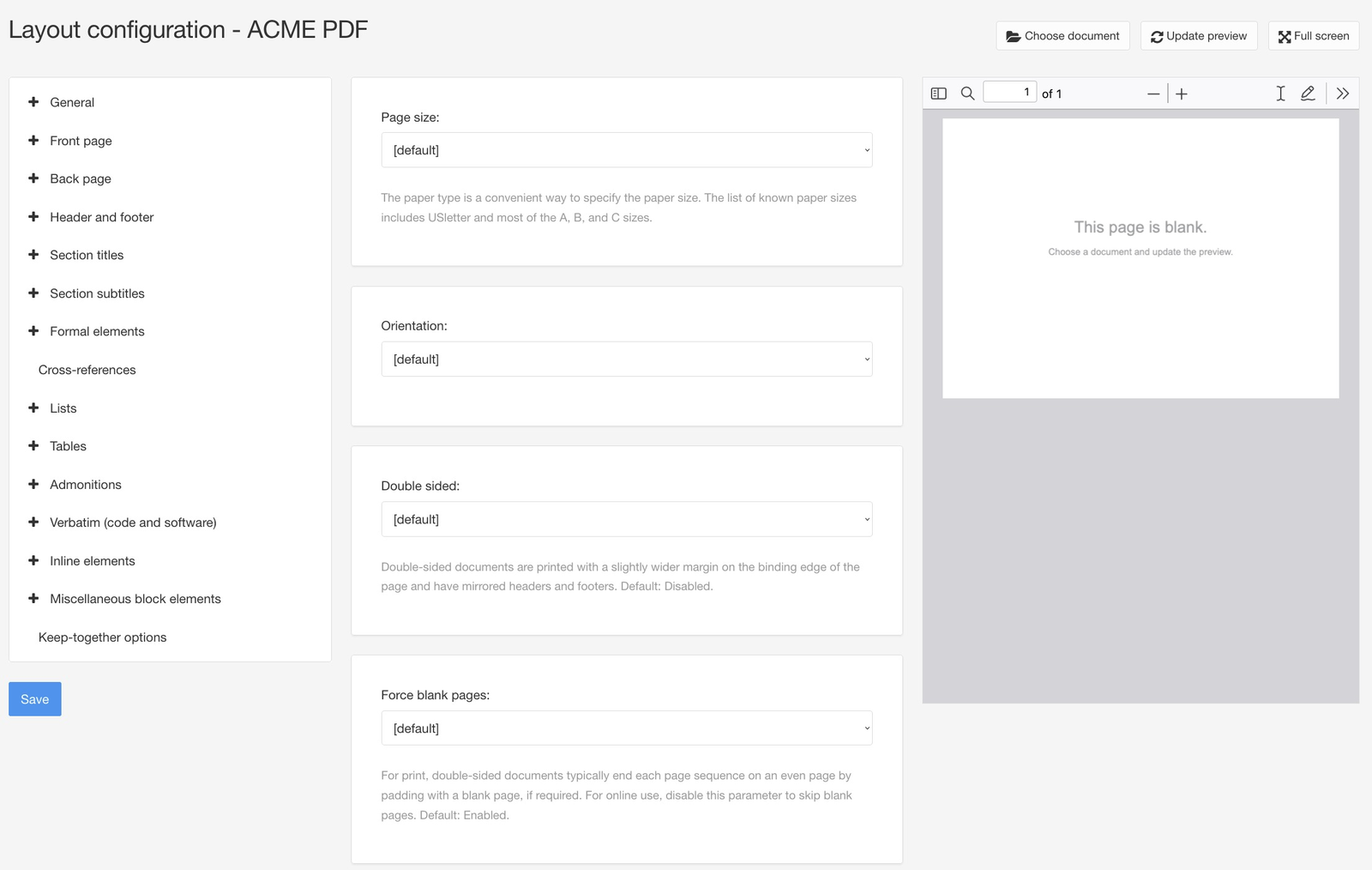
Topicary generates print-optimized PDFs with branded cover pages, TOCs with page numbers and dot leaders, running headers, custom footers, and configurable fonts. What it does not have: auto-numbering, per-page-type layouts, watermarks, prepress, or back-of-book index generation. Paligo's Layout Editor and MadCap Flare both provide those.
Most teams of 2 to 10 writers use PDF for sharing, not print production. The gap is layout depth. For auto-numbered sections, per-page-type control, or prepress marks, Paligo's Layout Editor is a genuine advantage.
Where Topicary fits better
Editor experience
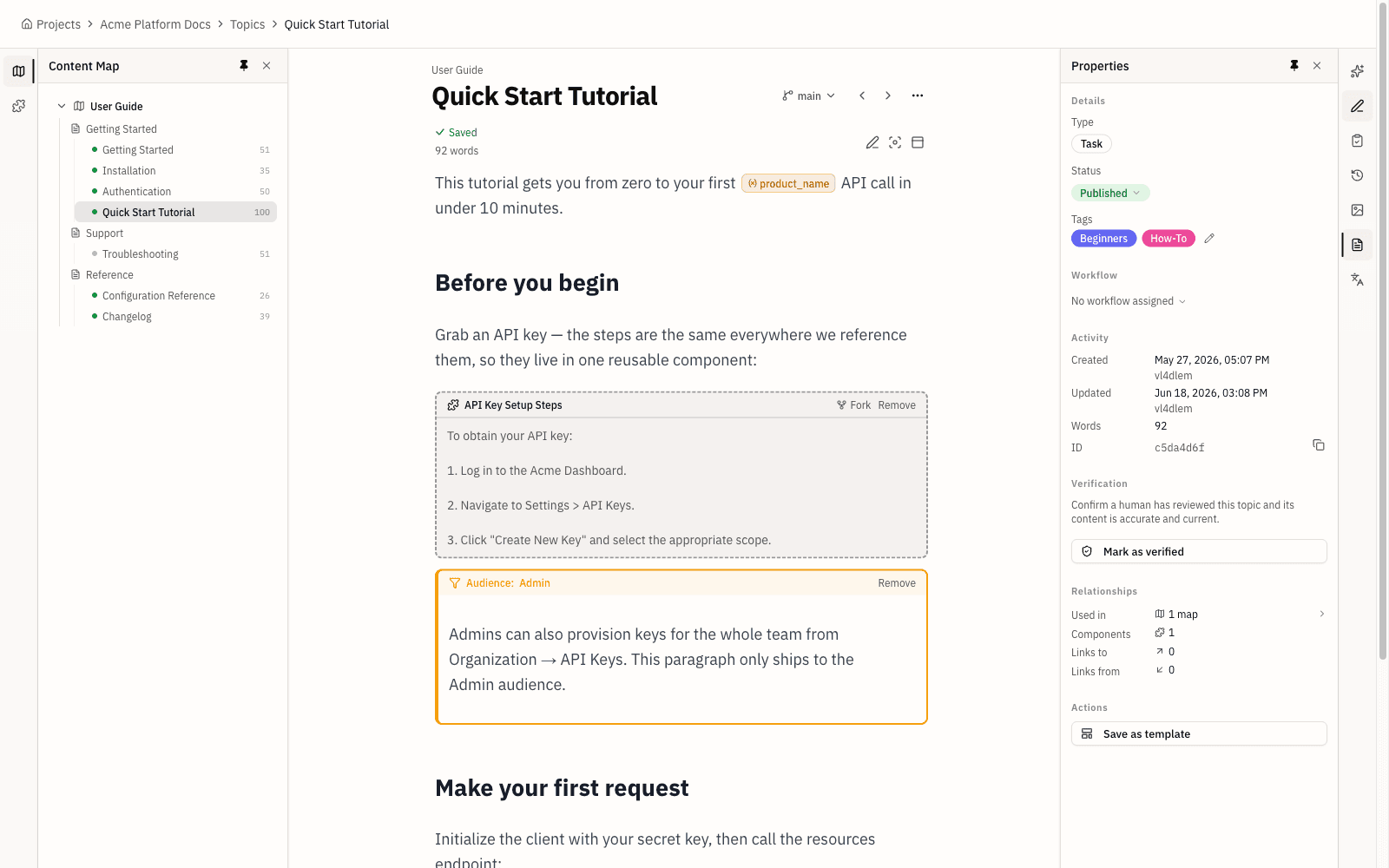
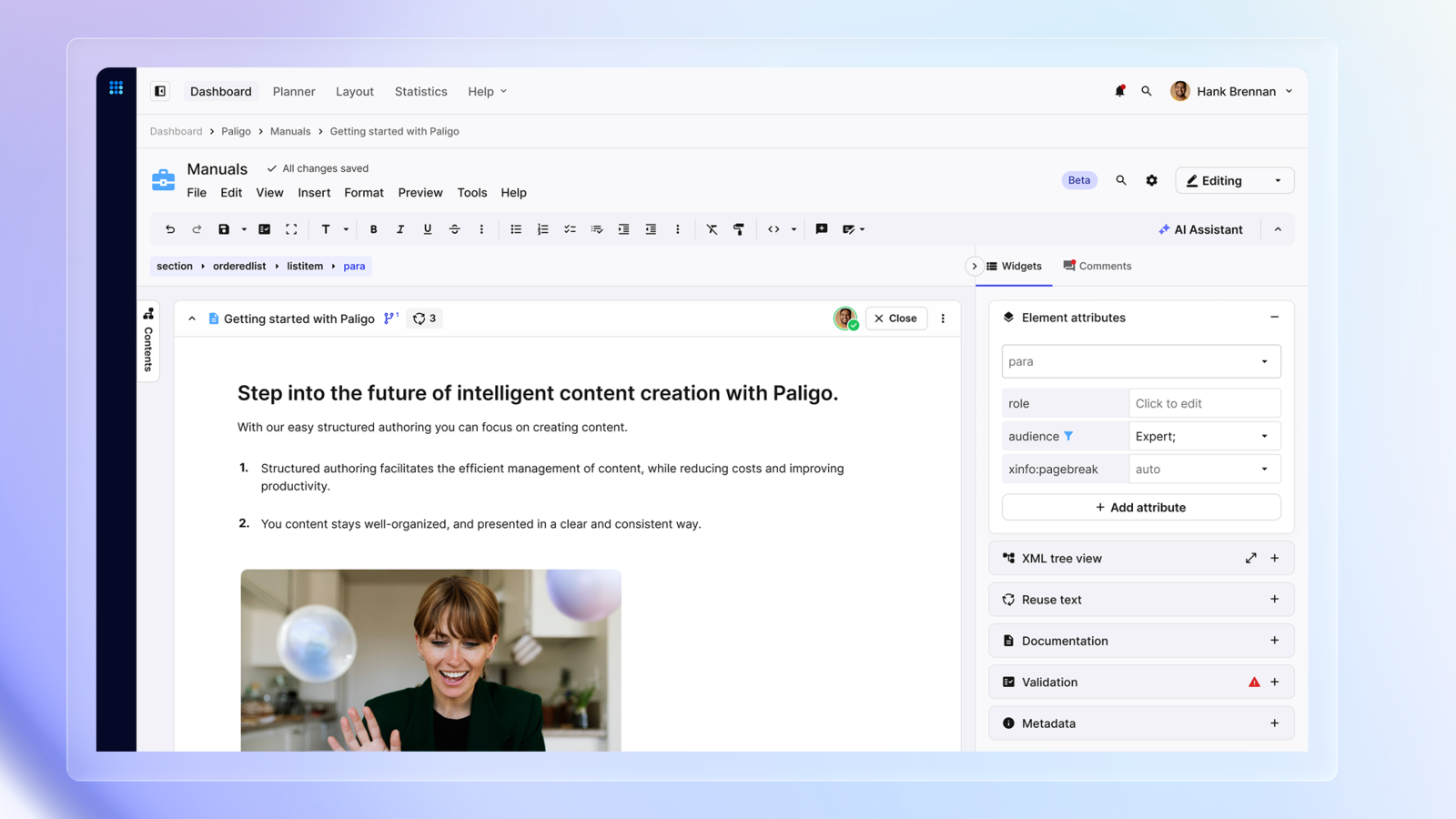
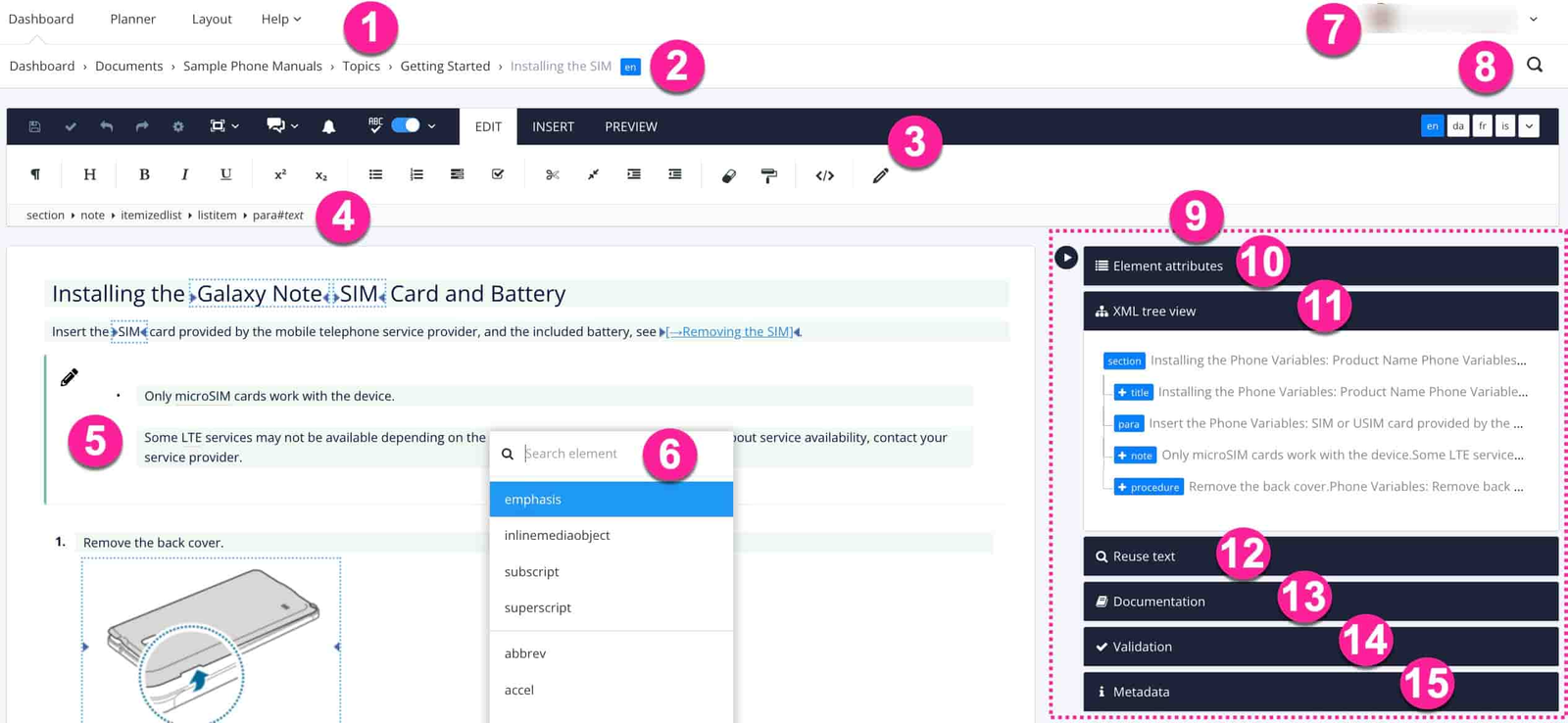
Topicary's block editor needs no XML or training; Paligo's DocBook editor enforces element rules and draws recurring learning-curve complaints.
| Paligo | Topicary | |
|---|---|---|
| Model | Visual editor over DocBook XML, element constraints at cursor | Block editor: slash commands, bubble toolbar, no XML |
| Learning curve | Recurring friction in G2 reviews (57 reviews) | Familiar to Notion/Google Docs users |
| Advanced editing | XML code view available | Not applicable (no XML) |
| User feedback | "Brutally hard to copy text and formatting" (reddit) | Standard clipboard, no element placement rules |
One r/technicalwriting user reported that their team does "ALL of our collaboration outside of Paligo." They draft in Confluence, review in Jira, and use Paligo only for publishing (reddit). Paligo's defenders note it is "a good solid product" once you learn topic-based authoring concepts. They call customer support responsive (reddit).
SME review without logins
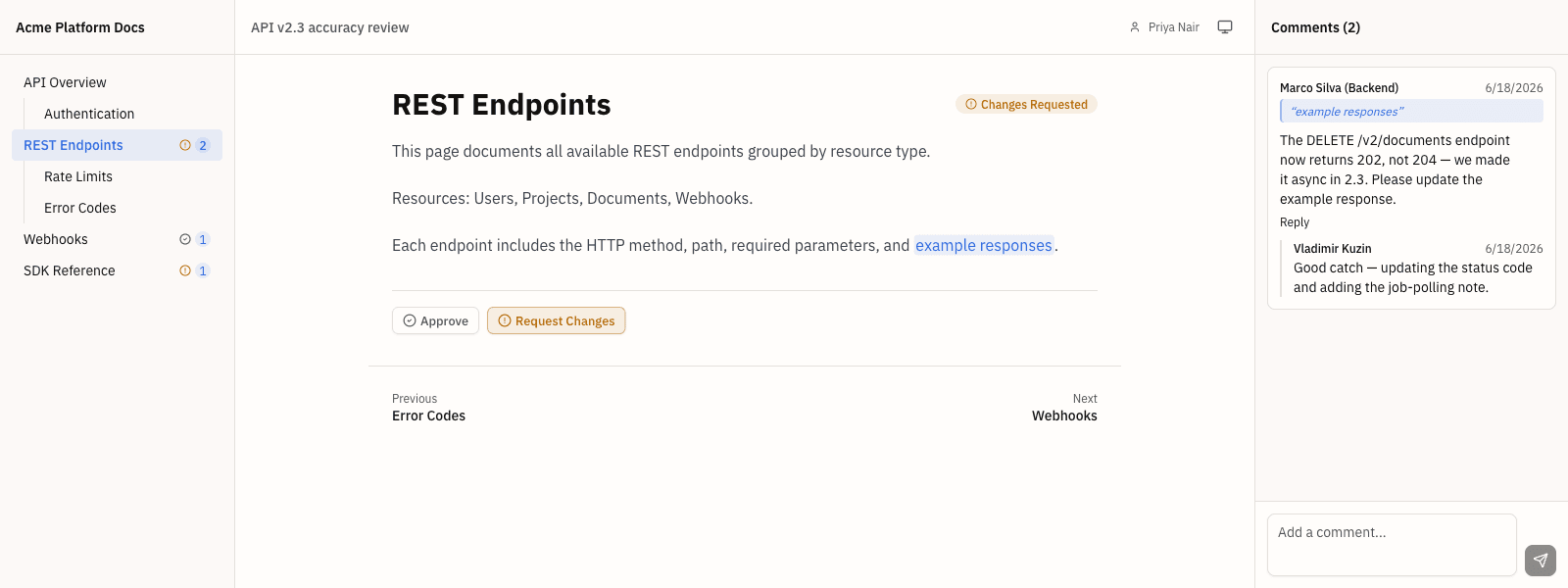
Topicary reviewers open a link with no account and no per-seat charge; Paligo requires reviewer accounts.
- Topicary: Generate a unique link → SME opens it, reads, comments, approves. No account. No login. No charge per reviewer.
- Paligo: Reviewer accounts, a separate license type from authors. Reviewers use a preview-only mode with side-panel comments. Multiple r/technicalwriting users cite friction: "nobody wants to have to sign into another system to do reviews." One team exports to Word and collects feedback in Google Docs instead (reddit).
Publishing and reader experience
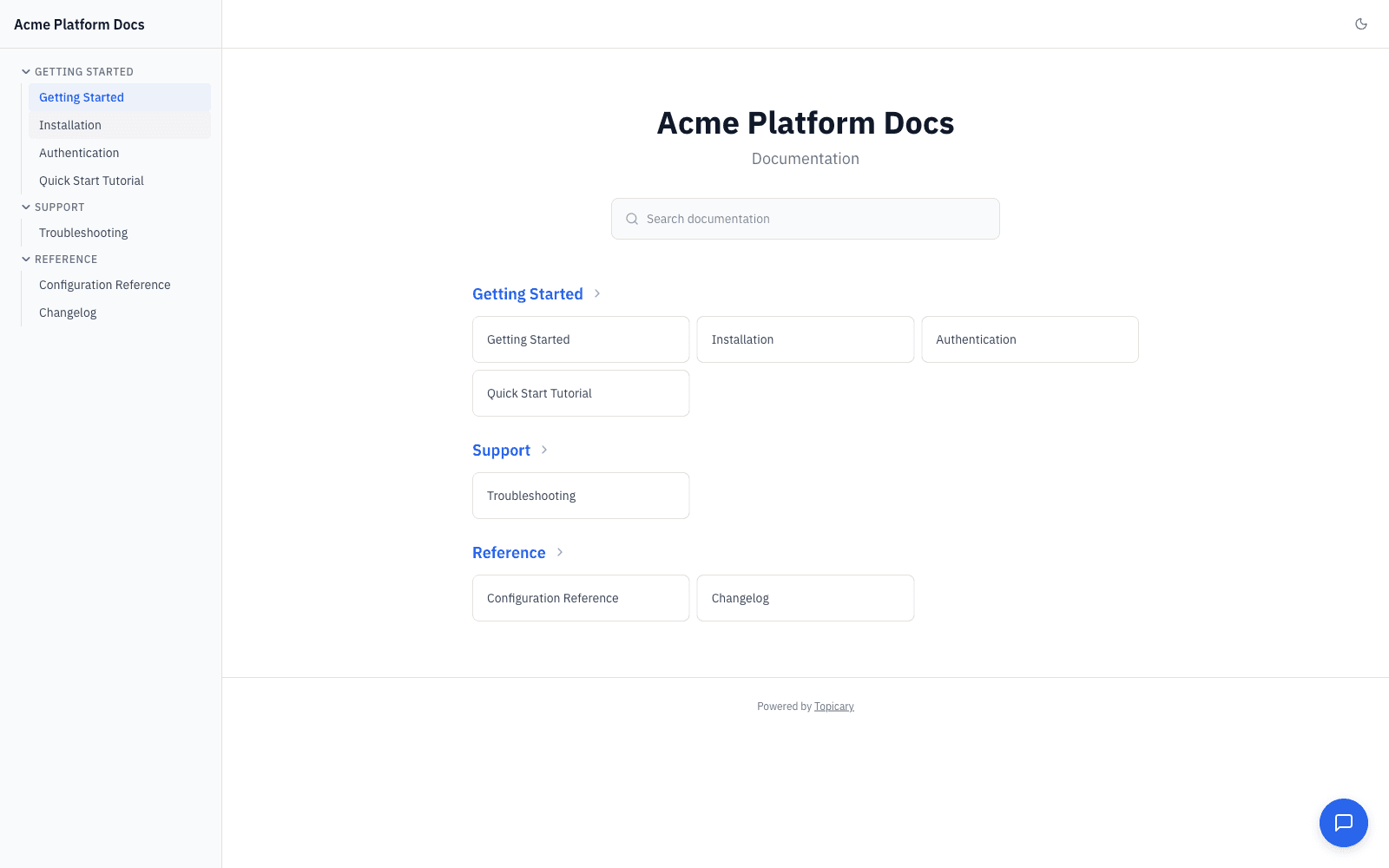
Topicary hosts the site itself with AI search, dark mode, feedback, and API explorers. Paligo leans on a Netlify integration or a separate Content Delivery Portal add-on.
| Paligo | Topicary | |
|---|---|---|
| Hosting | One-click via Netlify integration | Built-in, no third party |
| Search | Built-in (described as "hot trash" by one r/technicalwriting user, reddit) | Full-text + AI-powered chat widget |
| Reader feedback | Not built-in | Per-page feedback widget |
| Dark mode | Not built-in | Included |
| API docs | No interactive explorer | OpenAPI Try It panels |
LLM-ready output
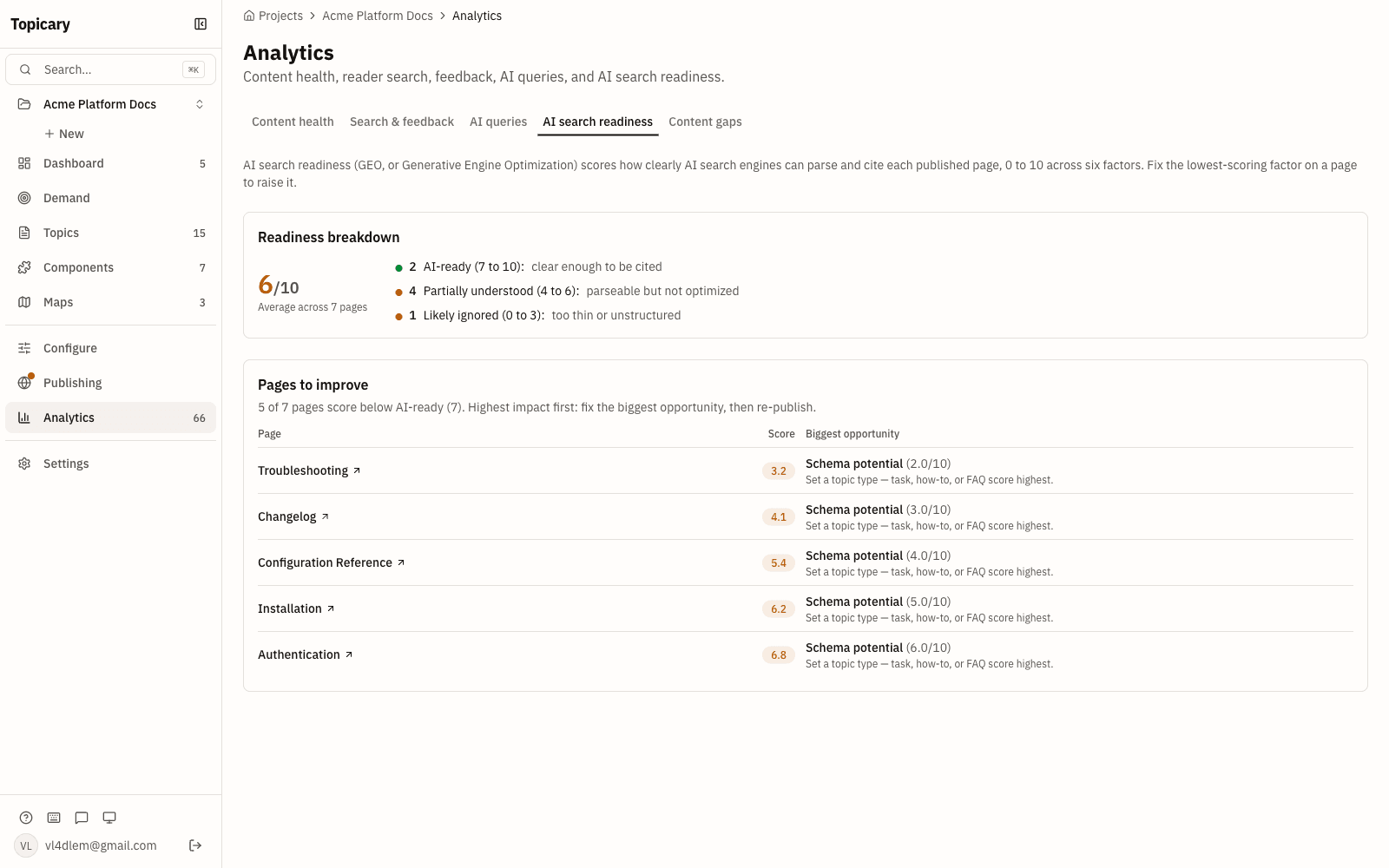
Every published site auto-generates llms.txt, .md URLs, an ?ask= endpoint, and an MCP server. Paligo's portal has a reader-facing AI chatbot but none of these machine-readable surfaces.
Every published site automatically generates:
- llms.txt: page index for AI crawlers
- llms-full.txt: full content as Markdown
- .md URLs for every page
- sitemap.md for AI agent path discovery
- ?ask= endpoint for AI agent queries
- MCP server: 4 read-only tools for programmatic access
Content goes through the full publishing pipeline (components resolved, conditions filtered, variables replaced) before Markdown is generated.
Paligo's Content Delivery Portal adds a reader-facing RAG chatbot, a paid add-on. Readers get a chat box. Agents get nothing they can consume directly. As of May 2026 Paligo generates no llms.txt, no llms-full.txt, no per-page .md URLs, no sitemap.md, and no MCP server. That agent-facing surface is what gets automated on every site here.
Transparent pricing
Free, Pro, and Team pricing is published here, with reuse and conditions included; the Business plan is priced on request. Paligo's entry plan starts at $15,000/yr (2 authors), with most deals higher (Vendr median ~$32,680/yr).
Free, Pro, and Team carry flat public pricing. Business, which holds branching and translation, is priced on request. Paligo publishes one number, Business from $15,000/year. Everything above it is quote-based.
Topicary:
| Team size | Plan | Monthly | Annual | Per writer/month |
|---|---|---|---|---|
| 1 writer | Free | $0 | $0 | $0 |
| 3 writers | Pro | $79 | $948 | ~$26 |
| 5 writers | Team | $149 | $1,788 | ~$30 |
| 10 writers | Team | $149 | $1,788 | ~$15 |
| 10+ writers | Contact us | n/a | n/a | n/a |
Team covers up to 10 authors at a flat $149/month, no per-seat charges. Currently free during beta, join here.
Paligo (not public):
Paligo's pricing page lists Business from $15,000/year; Enterprise is a custom quote (checked October 26, 2026).
- Business: annual subscription with per-author licensing; 2 authors and 2 languages included
- Enterprise: custom, adding single sign-on, the full integration ecosystem, advanced translation management and a dedicated customer success manager
- Occasional users (reviewers, translation reviewers, SME contributors) take separate license types
- New paid add-ons: Nexus Portal (hosted delivery, from $5,000/year) and Nexus Answers (AI answers, from $6,000/year); AI translation runs on prepaid token packages
Third-party data from Vendr (checked May 2026):
- Median annual contract: $32,680
- Range: $17,203 (low) to $42,425 (high)
- Hidden costs: storage overages, publication volume overages, advanced integrations, professional services (20 to 40% of first-year spend)
- Renewal trajectory: 3 to 7% annual increases are standard
The trade-off is real. That price buys multiple TMS integrations, component forking with scoped filtering, and XSL-FO PDF depth. Daily use of those features decides whether the cost difference is justified.
If you are evaluating desktop alternatives, see the MadCap Flare comparison. For a full roundup of documentation tools, see the technical writing software comparison.
Migration path
Paligo stores content as DocBook XML. Topicary does not import DocBook directly.
| Step | Action |
|---|---|
| 1. Export | Export from Paligo as HTML5 (cleanest path). Or export as DocBook XML and convert to HTML via Pandoc. |
| 2. Import | Import HTML into Topicary. Topic text, headings, lists, tables, images, and code blocks transfer with hierarchy preserved. |
| 3. Recreate metadata | Component reuse relationships, variables, conditions, and branching state do not carry between tools with different content models. Set up manually in Topicary. |
| 4. Validate | Plan 1 to 2 days per 50 topics, depending on component, variable, and condition usage. |
This is the honest reality of migrating between any 2 CCMS tools with different architectures. Content transfers. Metadata does not. Multiple r/technicalwriting users report similar friction migrating into Paligo: one user who migrated from AuthorIT described "a LOT of tedious clean up" (reddit).
Topicary also imports from MadCap Flare, DITA, Confluence, Word, Markdown, and OpenAPI. If you are comparing lighter tools, see Topicary vs GitBook.
Disclosure: This page is published by Topicary. I compete with Paligo. I have tested Paligo directly and cite specific documentation, pricing pages, and user reviews. Paligo pricing checked against paligo.net/pricing/ on October 26, 2026. Vendr contract data checked against vendr.com/marketplace/paligo on May 26, 2026. If you find an error, email support@topicary.com and I will correct it within 24 hours.