Topicary vs MadCap Flare
Topicary is a cloud-native CCMS starting at $79/mo for 3 writers. MadCap Flare is a desktop authoring tool at $3,150/yr per seat. Both do structured authoring: content reuse, conditions, variables, multi-format publishing. The core difference is where the software lives. Flare runs on your local machine with 20 years of accumulated depth. Topicary runs in the browser with a modern editor, hosted publishing, and no install step.
MadCap discontinued perpetual licenses. New customers must subscribe at $3,150/yr per seat (madcapsoftware.com/pricing/, checked August 2026 - up from $2,999 earlier in 2026). If that move has you evaluating alternatives, this page covers what you gain, what you lose, and what the migration looks like.
At a glance
Platform
Topicary
Any browser, any OSMadCap Flare
Windows desktop (Mac via Parallels)Price (5 writers)
Topicary
$1,788/yr (Team plan)MadCap Flare
$15,750/yr desktop onlyTime to productive
Topicary
Same day, works like NotionMadCap Flare
Weeks to months (Capterra Ease of Use 3.5/5)Collaboration
Topicary
Real-time co-editing, track changesMadCap Flare
Git merge conflicts or Flare Online add-onPublishing
Topicary
Hosted (publish and it's live)MadCap Flare
Self-host or pay for Flare OnlinePDF engine
Topicary
Print-ready: cover, TOC, headers; no auto-numbering or indexMadCap Flare
Full: auto-numbering, index, master pages, prepressOffline
Topicary
Cloud-only, needs internetMadCap Flare
Full offline (desktop app)Output formats
Topicary
6 (web, PDF, MD, DITA, Word, XLIFF)MadCap Flare
10 (incl. EPUB, PPT, CHM)Filled marker = leads this capability. Even rows are unmarked.
Cloud vs desktop
Flare is a Windows desktop application. Topicary runs in any browser. That is the fundamental difference. Every other comparison below flows from it.
Flare's desktop model
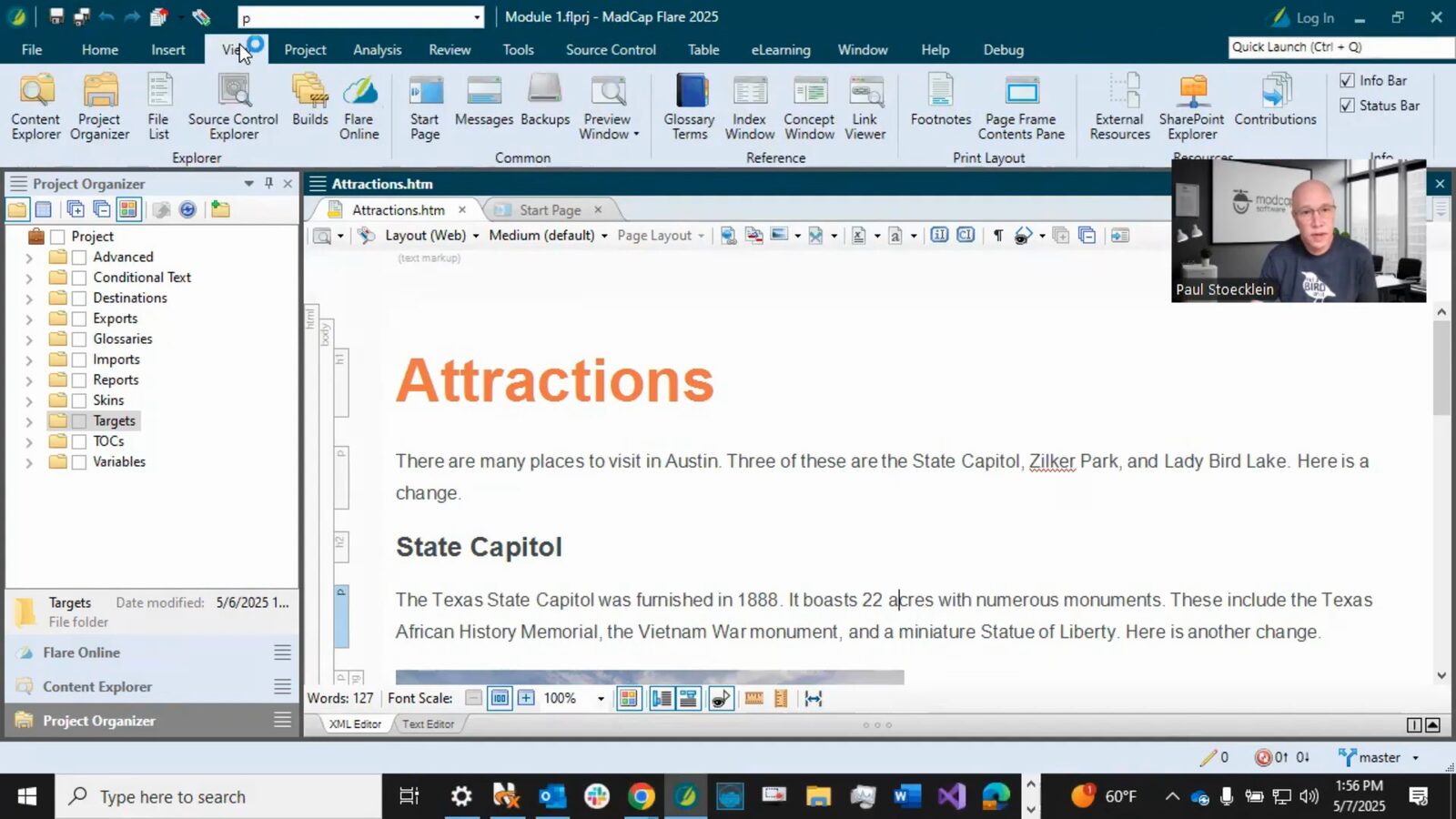
Flare runs as a Windows desktop app with Git-based collaboration and local builds, which is overhead without a dedicated tooling admin.
- Every writer needs a local Windows install (Mac users need Parallels or VMware Fusion, MadCap blog)
- Projects live on disk, shared through Git, SVN, or Flare Online
- Collaboration means merge conflicts. Flare's Git support has been described as "bug ridden" on Capterra
- Builds happen locally. Forum users report 4+ hours for PDF builds from 25,000-topic projects (forums.madcapsoftware.com)
- Capterra reviewers describe Flare as a "memory hog requiring above-average computing power"
Git-based collaboration amplifies the friction. Tom Johnson (idratherbewriting.com) observed that "Git is far too complex for a team of writers of varying technical levels." One new writer admitted she was "afraid to make a change for fear of making a mistake." The tooling is the problem. Without a dedicated tooling administrator, Git in Flare becomes overhead that has nothing to do with writing documentation. For what reviewers praise and criticize in aggregate, see the MadCap Flare review.
Topicary's cloud model
Topicary runs in any browser with simultaneous editing and second-long publishing, with nothing to install or build locally.
- Runs in any browser on any OS, with nothing to install
- Content lives in a cloud database, with no local file management
- Multiple writers work simultaneously with live cursors and presence awareness
- Publishing takes seconds, with no local build step
- Offline queue syncs automatically when connectivity returns
Flare Online narrows the gap
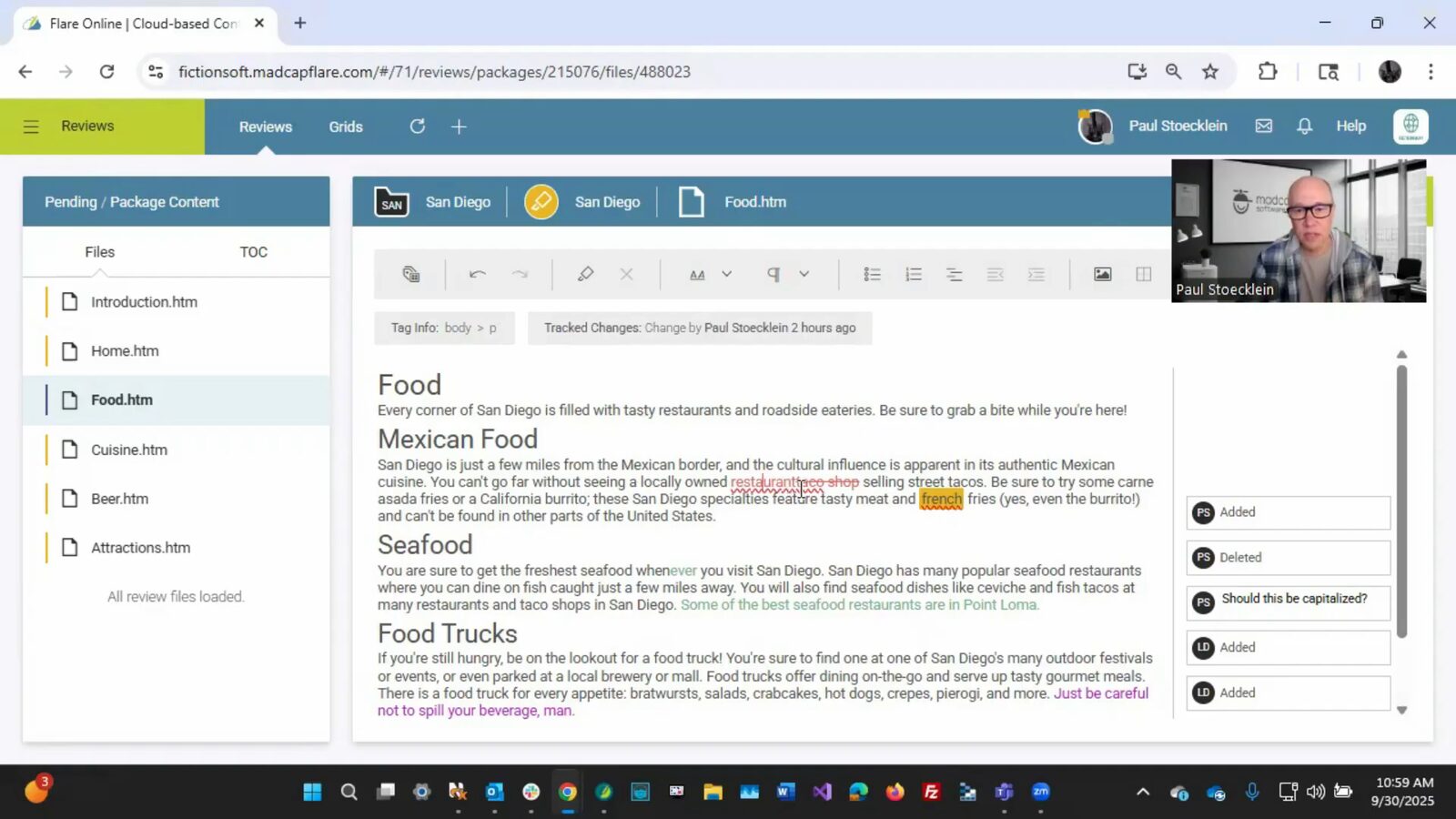
Flare Online adds browser authoring but is an extra undisclosed-price subscription on top of the desktop license.
MadCap launched Flare Online (rebranding MadCap Central) in May 2025. It adds browser-based authoring and collaborative editing. This narrows the cloud gap. But Flare Online is an additional subscription on top of the per-seat desktop license. Its pricing is undisclosed ("Contact Sales" for all tiers, checked May 2026).
Flare's desktop model works for a team with dedicated IT support, Windows-only writers, and an established Git workflow. Say your team is 3 to 5 writers who want to open a browser and start writing. Then the infrastructure overhead is hard to justify.
Feature comparison
Content model
Topicary
JSON-based block model stored in the cloudMadCap Flare
XML-based topics (XHTML) stored as files on diskEditor
Topicary
Browser block editor: slash commands, bubble toolbar, any OSMadCap Flare
Desktop ribbon toolbar, XML view, Windows only; Flare Online adds a browser editorContent reuse
Topicary
Reusable components with where-used tracking and orphan detectionMadCap Flare
Snippets, cross-project linking (Global Project Linking)Conditions
Topicary
Boolean AND/OR/NOT via visual builder, block-level only, in-editor previewMadCap Flare
Boolean AND/OR/NOT, inline-level tagging, 4-level override hierarchyVariables
Topicary
Key-value text with per-target overrides; no date/time or system variablesMadCap Flare
Variable sets with overrides, date/time, system variablesPDF output
Topicary
Print-optimized: cover, TOC with dot leaders, running headers, custom footer, fontsMadCap Flare
Full page composition: master pages, auto-numbering, index, cross-ref page numbers, prepressWeb publishing
Topicary
Hosted sites: dark mode, full-text + AI search, reader feedback, custom CSSMadCap Flare
HTML5 output, self-host or Flare Online (additional subscription)Import
Topicary
Markdown, HTML, DITA, Confluence, Flare, Word, OpenAPI (7)MadCap Flare
DITA, Word, RoboHelp, HTML, FrameMaker, ConfluenceExport
Topicary
6 formats: web, PDF, Markdown, DITA XML, Word, XLIFF 2.0MadCap Flare
10 formats: PDF, HTML5, Word, EPUB, DITA, PowerPoint, CHM, Eclipse Help, FrameMaker, XHTMLReview
Topicary
Token-based: unique link per session, no login, inline comments, approve/rejectMadCap Flare
Flare Online required: review packages, browser-based commentsAI
Topicary
5 AI actions (draft, rewrite, expand, summarize, improve) + AI reader searchMadCap Flare
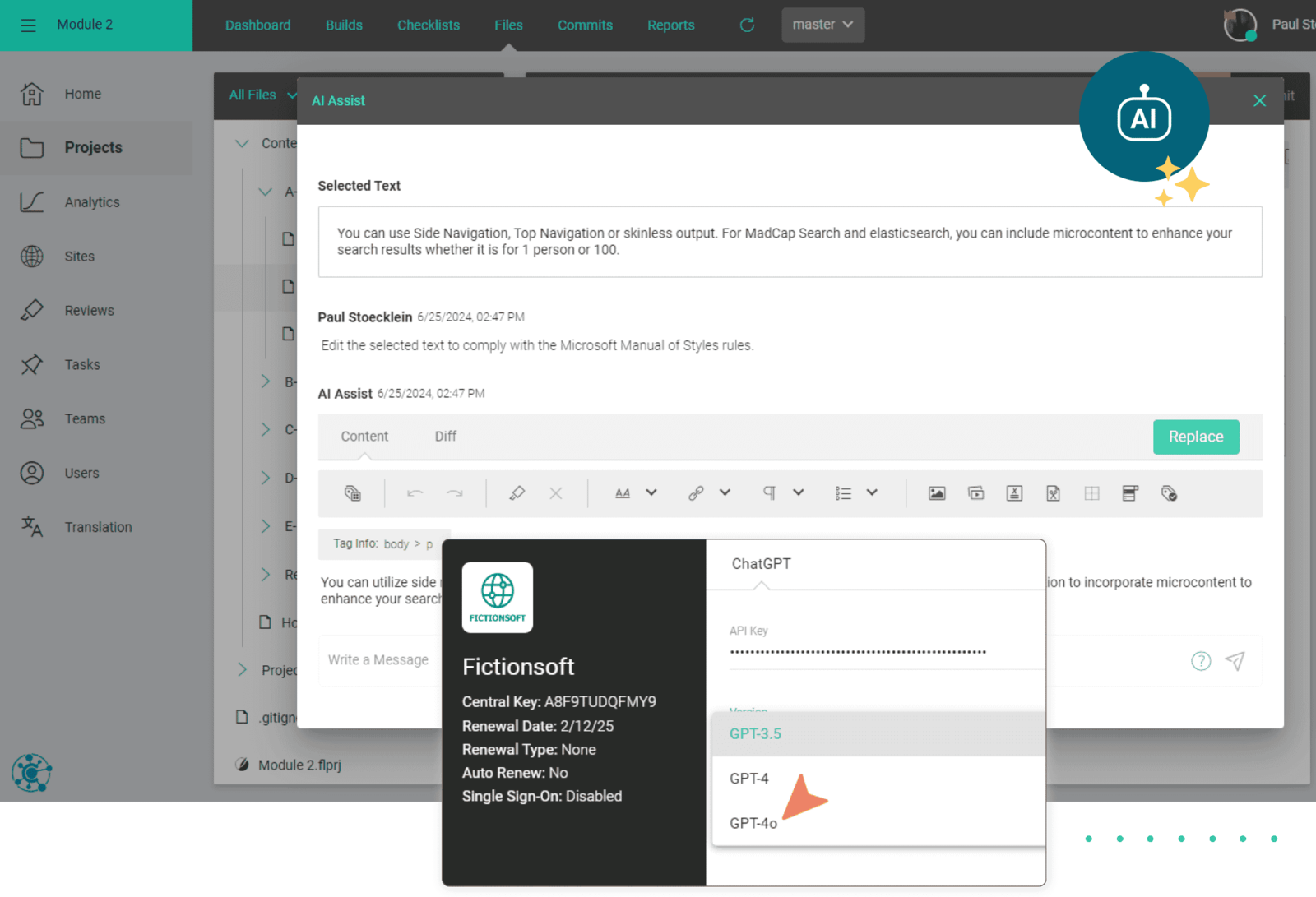
AI Assist (GPT-4o) via Flare Online subscriptionLLM-ready
Topicary
llms.txt, llms-full.txt, .md URLs, sitemap.md, ?ask= endpoint, automaticMadCap Flare
No built-in support; third-party llms.txt plugin ($99/yr)Version control
Topicary
Bidirectional GitHub sync, version history, publication versioning, topic branching with 3-way mergeMadCap Flare
Git or SVN integration with full branchingCollaboration
Topicary
Real-time co-editing (Yjs CRDT), live cursors, presence, offline queue, track changesMadCap Flare
Desktop: Git merge conflicts. Flare Online: concurrent editingBatch publishing
Topicary
One target at a time. No CLI. No CI/CDMadCap Flare
Build all targets in one operation. CLI builds (madbuild.exe) for CI/CDOffline
Topicary
Cloud-only, requires internetMadCap Flare
Full offline capabilitySSO/SAML
Topicary
Team plan (SAML 2.0)MadCap Flare
Via Flare OnlineFilled marker = leads this capability. Even rows are unmarked.
The deep dives below cover where each tool leads, and the trade-offs behind every marker above.
What Flare does better
3 areas where Flare still has depth not yet matched.
PDF output quality
Flare's PDF engine adds auto-numbering, page-number cross-references, a back-of-book index, and prepress that Topicary doesn't match.
Flare's PDF engine is purpose-built for page composition:
- Auto-numbered figures and tables: Figure 3.1, 3.2 with chapter resets
- Cross-references that resolve to page numbers: "See 'Installation' on page 42"
- Back-of-book index: generated from scattered index keywords
- Master page layouts: full control over running headers, footers, and page regions
- Prepress features: bleeds, crop marks, widow/orphan control
Topicary generates print-optimized PDFs. Each carries a branded cover page, running headers, TOCs with page numbers and dot leaders, custom footers, and configurable fonts. What it does not have: auto-numbered chapters/figures, cross-reference page numbers, back-of-book index, master page layouts, or prepress.
Its output works for professional PDFs and internal review. For 500-page regulatory compliance documents with back-of-book indices and auto-numbered sections, Flare has more depth.
Condition granularity
With boolean expressions now matched, Flare still leads on inline sentence-level tagging and a 4-level override hierarchy.
Topicary now supports boolean condition expressions (AND/OR/NOT) through a visual builder with in-editor preview. The expression gap is closed. Flare's remaining advantages:
- Inline-level condition tagging: tag individual sentences and phrases within paragraphs (Topicary applies conditions at block level only)
- 4-level override hierarchy: target → topic → snippet → content with defined override order (Topicary applies at block level with target-level expressions)
- System variable integration: page numbers, date/time within condition expressions
For most teams, block-level conditions with boolean expressions cover the common use cases (audience, platform, product tier). The exception is sentence-level work. Hiding a single sentence inside a paragraph still needs Flare's inline tagging. Topicary would make you split that sentence into its own block.
Offline work and output breadth
Flare works fully offline and exports 10 formats; Topicary is cloud-only with 6 output formats.
| MadCap Flare | Topicary | |
|---|---|---|
| Offline | Full offline: desktop app, no internet needed | Cloud-only: auto-save persists locally, but no browse/publish/review |
| Formats | 10 (PDF, HTML5, Word, EPUB, DITA, FrameMaker, PPT, CHM, Eclipse, XHTML) | 6 (web, PDF, Markdown, DITA, Word, XLIFF) |
Flare runs locally. No internet dependency, no service outages. For writers in air-gapped environments, on aircraft, or in regions with unreliable connectivity, this is non-negotiable.
Where Topicary pulls ahead
No install, no learning curve
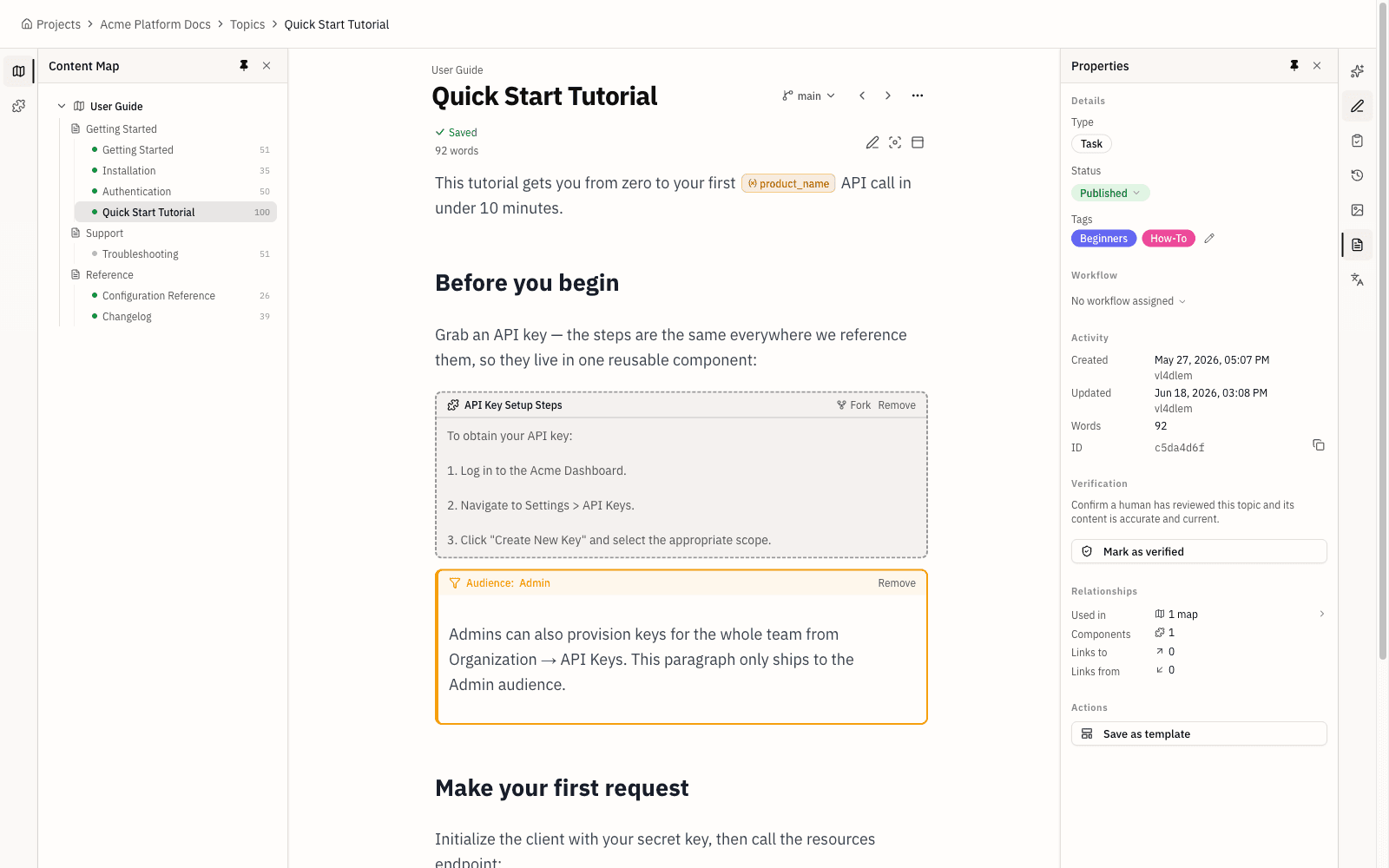
Topicary's browser editor feels familiar instantly, while Flare's steep learning curve is its most-cited criticism.
It works in any browser. Writers familiar with Notion, Google Docs, or Confluence recognize the slash-command editor and floating toolbar immediately. No XML. No ribbon toolbar.
Flare's learning curve is its most-cited criticism:
- G2: 485+ reviews (4.4/5 overall, checked May 2026), new-user complexity dominates negative feedback
- Capterra: Ease of Use: 3.5/5 across 21 reviews (checked May 2026)
- "It is literally impossible to learn Madcap Flare by yourself." (Capterra reviewer)
- "I have spent months learning Flare to import large documents... The pieces that must come together are tucked away in various nooks and crannies." (Capterra reviewer)
- Reddit describes Flare as a "feature Frankenstein": capabilities bolted on over 20 years
- The Write the Docs community noted "compatibility issues with closed systems like MadCap Flare" adding friction when integrating AI tools into documentation workflows (WtD Newsletter, September 2025)
Hosted publishing
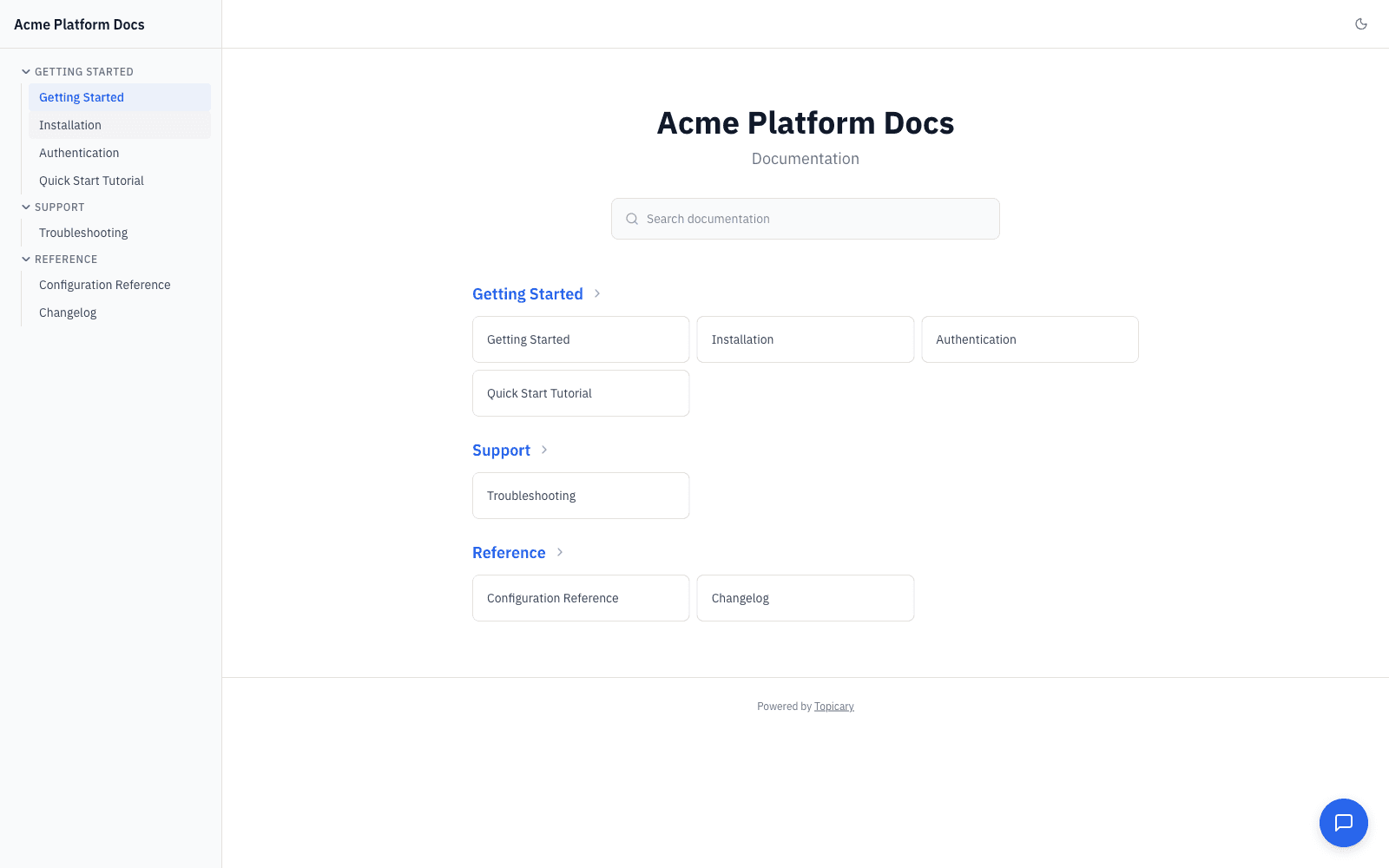
Topicary publishes live hosted sites with built-in search; Flare outputs static HTML you must deploy and host yourself.
| MadCap Flare | Topicary | |
|---|---|---|
| Output | Static HTML5: deploy to S3, Netlify, FTP, or your server | Hosted sites: publish and it's live |
| Search | Manual setup per deployment | Full-text search + AI-powered chat widget |
| Theming | Custom skins (complex XML config) | Dark mode, branding, custom CSS |
| Infrastructure | Self-host or buy Flare Online (additional subscription) | None, fully managed |
For a 3-person doc team, self-hosting is infrastructure work, not documentation work.
SME review
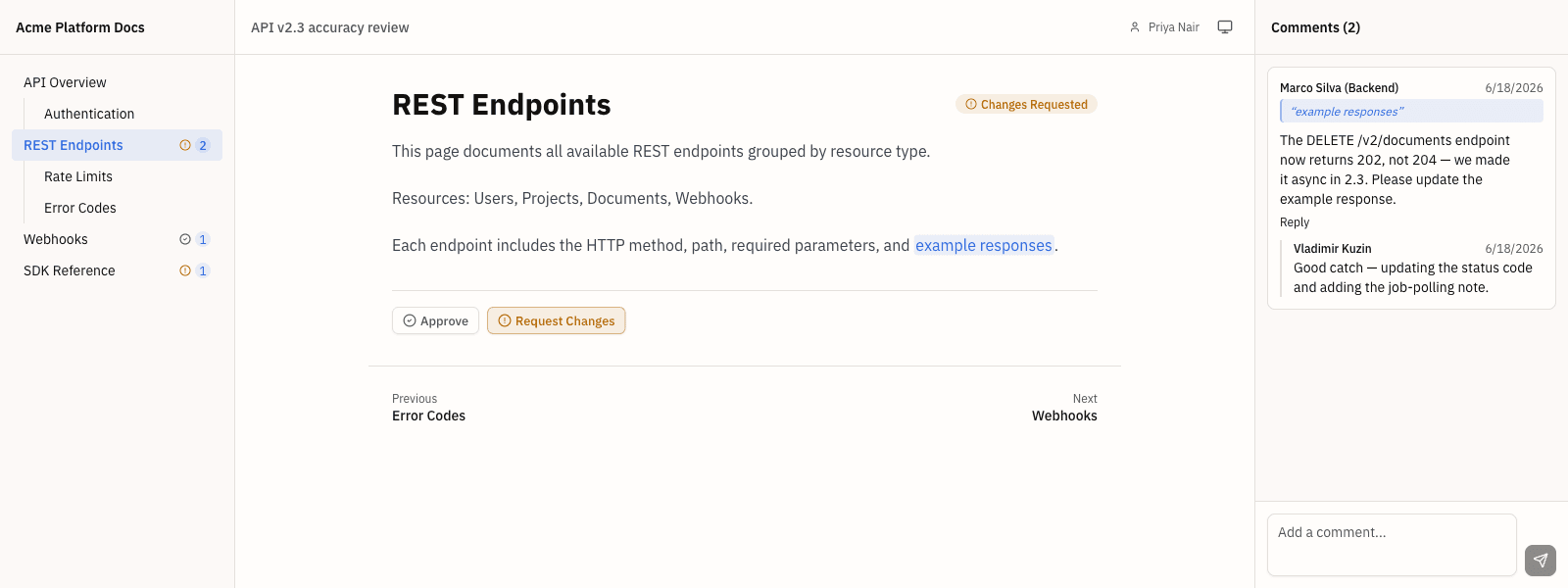
Topicary reviewers open one link with no account or install; Flare needs a Flare Online subscription or Word exports.
| MadCap Flare | Topicary | |
|---|---|---|
| Workflow | Create review package in desktop app → upload to Flare Online → reviewer opens browser editor | Generate unique link → SME clicks it |
| Requirements | Flare Online subscription | Nothing: no account, no install |
| Desktop-only users | No built-in review: export to Word/PDF, collect feedback by email | Same token-based workflow for all plans |
Transparent pricing
Topicary's flat published pricing undercuts Flare's $3,150-per-seat subscription, saving nearly $14,000 a year at 5 writers.
| Team size | MadCap Flare (desktop only) | Topicary | Annual savings |
|---|---|---|---|
| 1 writer | $3,150/yr ($263/mo) | $0 (Free) | $3,150 |
| 3 writers | $9,450/yr ($788/mo) | $948/yr ($79/mo Pro) | $8,502 |
| 5 writers | $15,750/yr ($1,313/mo) | $1,788/yr ($149/mo Team) | $13,962 |
| 10 writers | $31,500/yr ($2,625/mo) | $1,788/yr ($149/mo Team) | $29,712 |
| 15 writers | $47,250/yr ($3,938/mo) | Contact us (Team caps at 10) | n/a |
Flare pricing: $3,150/yr per seat subscription (madcapsoftware.com/pricing/, checked August 2026). Flare Online is additional, pricing undisclosed. The full Flare pricing breakdown itemizes both, plus what teams report paying at renewal. The Team plan covers up to 10 authors at a flat $149/mo. There are no per-seat charges within a tier.
Procurement data from Vendr (checked May 2026) reports median annual MadCap spend of $5,585, with ~9% annual uplift on subscription renewals.
The trade-off: Flare includes a professional PDF engine, offline capability, and 10 output formats at that price. Ask whether your team uses that depth daily. The answer decides whether the premium is justified.
Flare project import
Topicary imports a zipped Flare project (topics, snippets, TOC, variables, conditions, targets, and branding) in under a minute.
The import dialog accepts a zip of your Flare project. The importer reads your .flprj project structure and transfers:
- Topics (HTM files) → Topicary topics with heading structure, paragraphs, lists, tables, images, code blocks, image alt text, and the topic's meta description preserved
- Snippets (.flsnp) → reusable components with reference tracking
- TOC structure (.fltoc) → map hierarchy with nesting preserved
- Variables (.flvar) → variable sets with key-value pairs, including per-target overrides
- Conditions (.flcts) → condition dimensions and values
- Targets (.fltar) → publication targets (web/PDF), each with its boolean condition expression, variable overrides, and homepage
- Branding → skin favicon and logo, master-stylesheet brand color tokens, and web font
- Images and downloads → uploaded to storage with
srcand download links rewritten
What does not transfer: micro content, master pages and page layouts (.flpgl), and the full Flare stylesheet (mc-* selectors). Also left behind: skin navigation chrome, system variables (page numbers/dates), and Flare-specific interactive elements (drop-downs, expanding text). A single "primary" brand color is not guessed. These require manual recreation or review.
For a typical Flare project with 100 topics, the import takes under a minute. Budget 1 to 2 days for reviewing the imported publishing targets, verifying component references, and checking condition profiles. For the step-by-step process, see the migration guide.
LLM-ready output
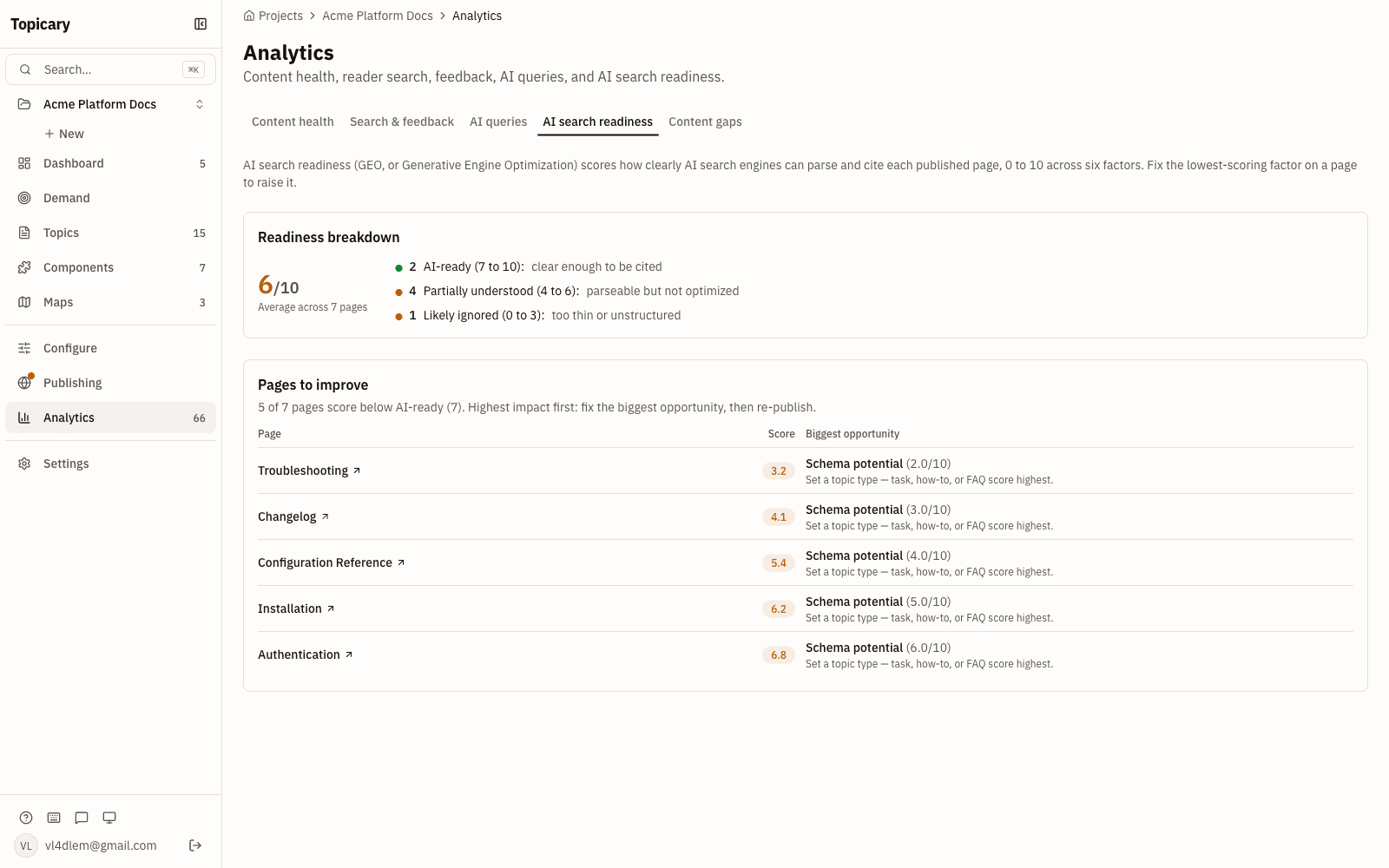
Every Topicary site auto-generates llms.txt, .md URLs, and an ask endpoint; as of May 2026, Flare has no built-in LLM-ready output.
Every published site automatically generates:
- llms.txt: page index for AI crawlers
- llms-full.txt: full site content as Markdown
- .md URLs for every page
- sitemap.md for AI agent path discovery
- ?ask= endpoint for AI agent queries
- Smart 404 pages with fuzzy matching and suggested content
Content goes through the full publishing pipeline (components resolved, conditions filtered, variables replaced) before Markdown is generated.
As of May 2026, Flare has no built-in LLM-ready output. A third-party llms.txt plugin exists ($99/yr). It does not add .md page serving, an AI query endpoint, or a smart 404. MadCap markets a "Syndicate" MCP server, but no public documentation or verification exists as of May 2026.
Teams also evaluating cloud CCMS tools should see the Paligo comparison. Paligo brings built-in TMS integrations and enterprise translation workflows at a higher price point. For teams considering lighter documentation tools, see Topicary vs GitBook. For a full roundup of all 7 tools documentation teams evaluate in 2026, see the technical writing software comparison.
Migration from Flare to Topicary
A Flare project is a folder containing XML files: topics (.htm), snippets (.flsnp), TOC files (.fltoc), variable sets (.flvar), condition tag sets (.flcts), targets (.fltar), skins (.flskn), and a project file (.flprj).
Step 1: Zip your Flare project. Locate your .flprj file and the enclosing project folder (including Content/ and Project/ subdirectories). Zip the entire folder.
Step 2: Import into Topicary. Open the import dialog, drop the zip, select "MadCap Flare." The importer shows a preview: topic count, snippets, variables, conditions, and TOC hierarchy.
Step 3: Review the import. Check heading structure, formatting, snippet references, variable names, and condition dimension mappings.
Step 4: Review what imported; recreate the rest.
| Flare feature | What happens in Topicary |
|---|---|
| Publishing targets (HTML5, PDF) | Imported as publication targets (with condition profile, overrides, homepage); review and publish |
| Target condition expressions | Imported as condition profiles, including boolean exclude/include; review |
| Skin favicon/logo, stylesheet brand tokens + font | Imported into project branding; review |
Full Flare stylesheet (mc-*) / single primary color | Not imported; reapply via Branding + custom CSS |
| Micro content | Convert to FAQ-style topics |
| Master pages and page layouts | Not applicable (Topicary uses hosted templates) |
| Inline (sub-block) condition tagging | Restructure; Topicary conditions are block-level |
| Cross-reference page numbers | Topic links (web-first model, no page numbers) |
Estimated effort: For 50 to 100 topics, import takes under a minute. Manual cleanup takes 1 to 3 days depending on Flare-specific feature usage. Projects with 200+ topics and Global Project Linking across multiple Flare projects take longer. Each Flare project must be imported separately.
Disclosure: This page is published by Topicary. I compete with MadCap Flare. I have tested Flare directly and cite specific documentation and pricing pages. All Flare pricing checked against madcapsoftware.com/pricing/ on May 26, 2026. If you find an error, email support@topicary.com and I will correct it within 24 hours.