Topicary vs Adobe RoboHelp
Adobe RoboHelp is a desktop help authoring tool, first released in 1992. It is now sold standalone at $39.99 per user each month through the Adobe store. Topicary is a cloud component content management system that runs in any browser. RoboHelp is one of the oldest tools in the category. It still has the widest publishing reach of any of them. Topicary is a newer platform built around cloud collaboration, inline AI, and hosted output.
The gap that matters is direction of travel. RoboHelp's 2020 release was its last with major new capabilities. Every version since has shipped small increments. Adobe points its enterprise CCMS investment at Experience Manager Guides instead. If your docs already have a home and you need deep output options, RoboHelp still does the job. If you want browser authoring, real-time collaboration, and an actively building vendor, the direction favors a cloud tool.
This page is one head-to-head. The full field of RoboHelp alternatives runs from MadCap Flare to free docs-as-code. If your shortlist is the two desktop veterans, MadCap Flare vs RoboHelp compares them directly.
At a glance
Platform
Topicary
Any browser, any OSAdobe RoboHelp
Windows and macOS desktopPrice (5 writers)
Topicary
$1,788/yr, hosting includedAdobe RoboHelp
$2,399/yr authoring, hosting extraReal-time collaboration
Topicary
Live co-editing, cursors, presenceAdobe RoboHelp
None: file-based with source controlAI authoring
Topicary
Inline AI: draft, rewrite, summarizeAdobe RoboHelp
None built inPublishing reach
Topicary
Hosted site, Zendesk, SalesforceAdobe RoboHelp
Zendesk, Salesforce, ServiceNow, SharePoint, AEMPDF output
Topicary
Print-optimized: cover, TOC, headersAdobe RoboHelp
Adobe PDF engine, mature depthHosting
Topicary
Included and managedAdobe RoboHelp
Self-host or RoboHelp ServerDevelopment pace
Topicary
Active, frequent releasesAdobe RoboHelp
Deep maintenance mode as of mid-2026Filled marker = leads this capability. Even rows are unmarked.
A desktop tool in maintenance mode
RoboHelp runs as an installed desktop application on Windows and macOS. Content is authored as HTML and XHTML topics. Reuse runs through snippets, variables, and condition tags. It publishes to a wide set of outputs. That single-sourcing model is battle-tested. It carries 30 years of refinement. For teams already fluent in it, the reuse mechanics are dependable.
Maintenance mode is not the same as broken. A tool that already does what you need, and does it reliably, stays useful. A slowed roadmap does not undo that. The risk is forward-looking. Documentation is shifting toward AI-assisted authoring and AI-consumed output. RoboHelp added no AI features and no cloud collaboration. It is falling behind on exactly the capabilities that are growing in importance. Pick a platform to live in for the next five years, and the vendor's investment signal is part of the decision.
Topicary makes the opposite bet. It runs in the browser, where multiple writers edit the same topic at once. Inline AI drafts and rewrites in place. Every published site ships AI-ready output automatically. The trade is real. RoboHelp reaches more publishing destinations and carries Adobe's PDF depth. Topicary wagers that cloud collaboration and AI matter more to most teams than output-format breadth.
Feature comparison
Content model
Topicary
Structured block model in the cloudAdobe RoboHelp
HTML and XHTML topics, DITA import and compatibilityEditor
Topicary
Browser block editor: slash commands, floating toolbarAdobe RoboHelp
Desktop editor, no block or slash editing, no MarkdownContent reuse
Topicary
Reusable components with where-used tracking and orphan detectionAdobe RoboHelp
Snippets, variables, condition tags refined over 30 yearsConditional content
Topicary
Boolean AND/OR/NOT via visual builder, in-editor previewAdobe RoboHelp
Condition tags with AND/OR expressions on topics and blocksVariables
Topicary
Key-value text with per-target overridesAdobe RoboHelp
Plain-text variable tokens, usable in attributesOutput breadth
Topicary
6 formats plus a hosted siteAdobe RoboHelp
Responsive HTML5, Frameless HTML5, PDF, CHM, mobile app, eBookPDF output
Topicary
Print-optimized: cover, TOC with dot leaders, headers, fontsAdobe RoboHelp
Adobe PDF engine with styling, security, and accessibility depthKnowledge-base publishing
Topicary
Zendesk and Salesforce sync (Business)Adobe RoboHelp
Zendesk, Salesforce, ServiceNow, Zoho, SharePoint, AEM, RoboHelp ServerWeb hosting
Topicary
Hosted sites: search, dark mode, AI chat widget, custom domainAdobe RoboHelp
Self-host output or license RoboHelp ServerReal-time collaboration
Topicary
Live co-editing, cursors, presence, track changesAdobe RoboHelp
None: single-author files, Git for versioningAI authoring
Topicary
Inline AI: draft, rewrite, expand, summarize, improveAdobe RoboHelp
None: Adobe ships Firefly elsewhere, nothing in RoboHelpLLM-ready output
Topicary
llms.txt, llms-full.txt, .md URLs, AI query endpoint, automaticAdobe RoboHelp
No built-in LLM-ready outputSME review
Topicary
Token-based link, no login, inline comments, approve/rejectAdobe RoboHelp
Review via Acrobat or shared PDF, reconciled in the desktop appContent health
Topicary
Stale-page, orphan, and broken-reference detectionAdobe RoboHelp
No automated content-health checksContext-sensitive help
Topicary
Not supportedAdobe RoboHelp
Map IDs and API for installed-software helpDevelopment activity
Topicary
Frequent feature releasesAdobe RoboHelp
RoboHelp 2026: two features plus a March bug fixFilled marker = leads this capability. Even rows are unmarked.
The deep dives below cover where each tool leads, and the trade-offs behind every marker above.
What RoboHelp does better
Three areas where RoboHelp has depth Topicary does not match.
Publishing reach
RoboHelp publishes to more destinations than any other tool in the category, direct from the authoring app.
RoboHelp's output breadth is a genuine strength. From one project it produces Responsive HTML5, Frameless HTML5, PDF, Microsoft HTML Help (CHM), a mobile app format, and eBook formats. It publishes directly to Zendesk, Salesforce, ServiceNow, Zoho, SharePoint Online, Adobe Experience Manager, and RoboHelp Server. Consider a team with a knowledge base in ServiceNow or a portal in SharePoint. Publishing straight from the authoring tool removes a whole handoff step.
Topicary publishes a hosted site and, on Business, syncs to Zendesk Help Center and Salesforce Knowledge. That covers the two most common knowledge-base targets. It does not reach ServiceNow, Zoho, SharePoint, or Experience Manager. On raw destination count, RoboHelp leads. It will keep leading until Topicary adds more integrations.
PDF and CHM output
RoboHelp carries Adobe's PDF engine and still produces CHM, which certain installed software requires.
RoboHelp's PDF output comes from Adobe, and it shows. It carries styling control, security options, accessibility tagging, watermarks, and multimedia handling built up over decades. It also still generates CHM (Microsoft HTML Help) and context-sensitive help with map IDs. Desktop software installers and older Windows applications sometimes require both. Topicary produces print-optimized PDFs with covers, a page-numbered table of contents, and running headers. It does not match Adobe's PDF depth. It does not produce CHM or context-sensitive help. For teams that ship installed software with an F1-help requirement, RoboHelp covers a need Topicary does not.
Mature reuse and cross-platform desktop
RoboHelp's 30-year reuse model runs on both Windows and macOS at a low solo price.
RoboHelp's snippets, variables, and condition tags have been refined across three decades. The model is dependable for teams that know it. Unlike most help authoring tools, RoboHelp runs natively on both Windows and macOS. A mixed-hardware team is not forced onto Windows-only machines. At $39.99 a month for a single author, it is one of the cheaper professional desktop tools. That price fits a solo technical writer who already has a place to host the output. Maturity, cross-platform desktop support, and a low solo price fit a specific kind of team.
Where Topicary pulls ahead
Cloud authoring, real-time collaboration, and AI
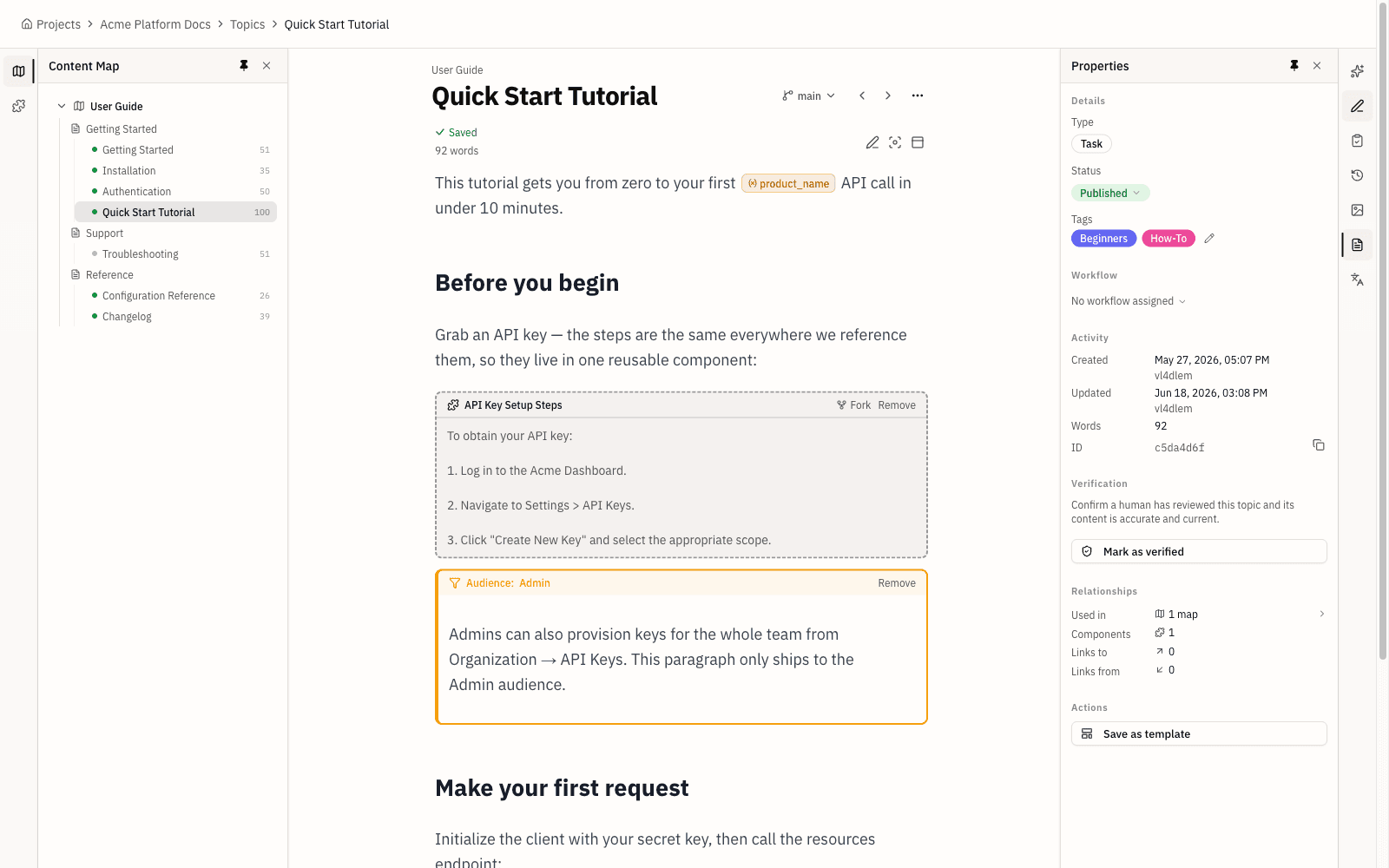
Topicary runs in the browser with live co-editing and inline AI; RoboHelp is a single-author desktop app with no AI.
Topicary opens in any browser, so there is no install and no Windows-or-Mac question. Multiple writers edit the same topic at once, with live cursors and presence. That removes the merge-conflict tax file-based tools carry. Inline AI drafts, rewrites, expands, and summarizes directly in the editor. The author approves a diff before anything changes. RoboHelp is a single-author-per-file desktop tool. It relies on source control for versioning and has no built-in AI at all. Adobe ships Firefly across Creative Cloud. None of it reaches RoboHelp. An author who wants AI assistance has to leave the tool to get it.
Hosted publishing, included
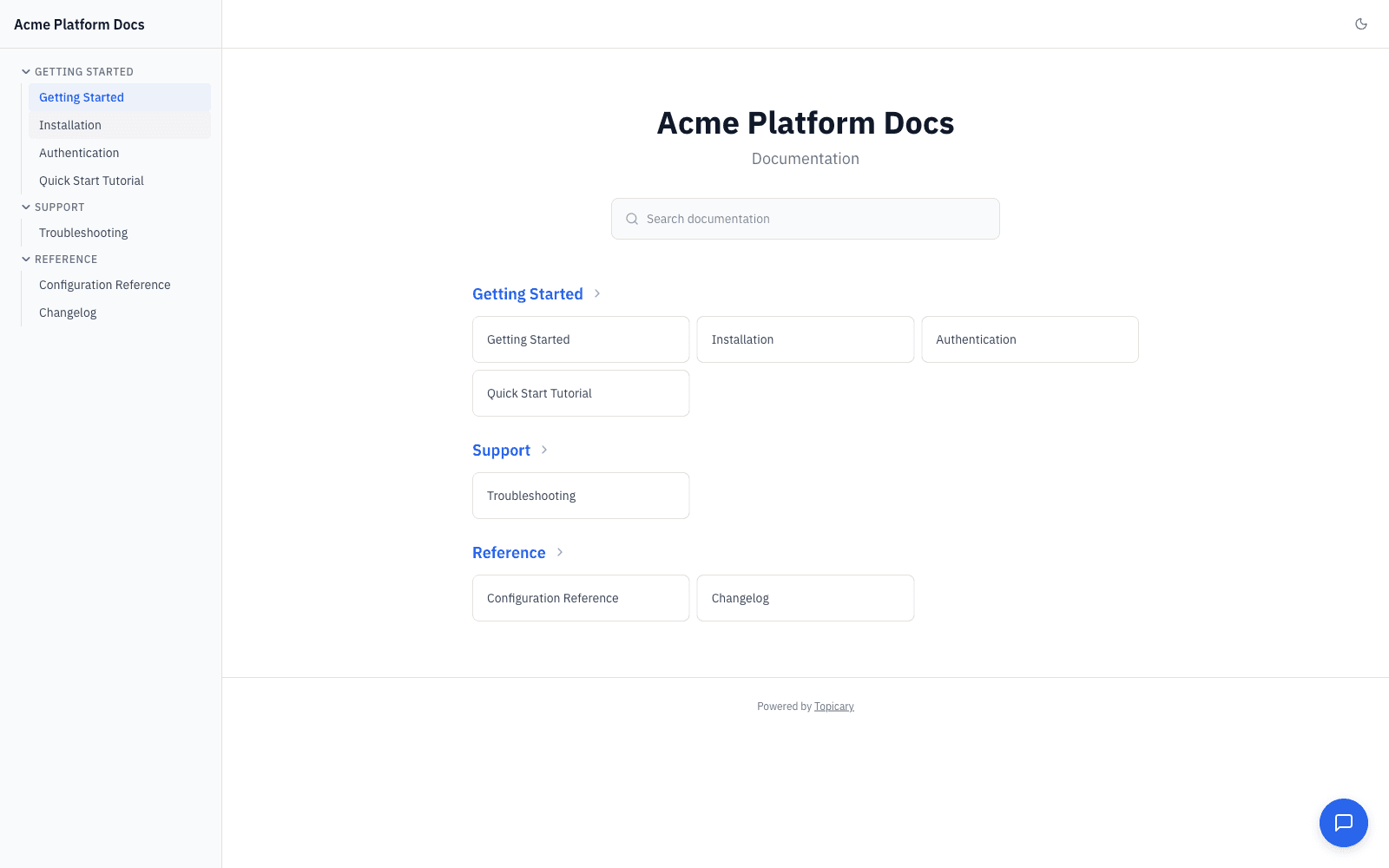
Topicary hosts the published site; RoboHelp makes hosting your problem.
With Topicary, publishing is one step and the hosted site is live. It arrives with full-text search, an AI chat widget, dark mode, and a custom domain. RoboHelp produces output files but does not host them. Getting a RoboHelp project onto a URL means self-hosting the HTML5 output or licensing RoboHelp Server. That server is enterprise-priced, self-hosted on Tomcat, and opaque in cost. The $39.99 monthly authoring price looks cheap until the hosting line is added. Then a solo writer is running infrastructure that has nothing to do with writing. Topicary folds hosting, AI, and SME review into a flat published price.
Active development and content health
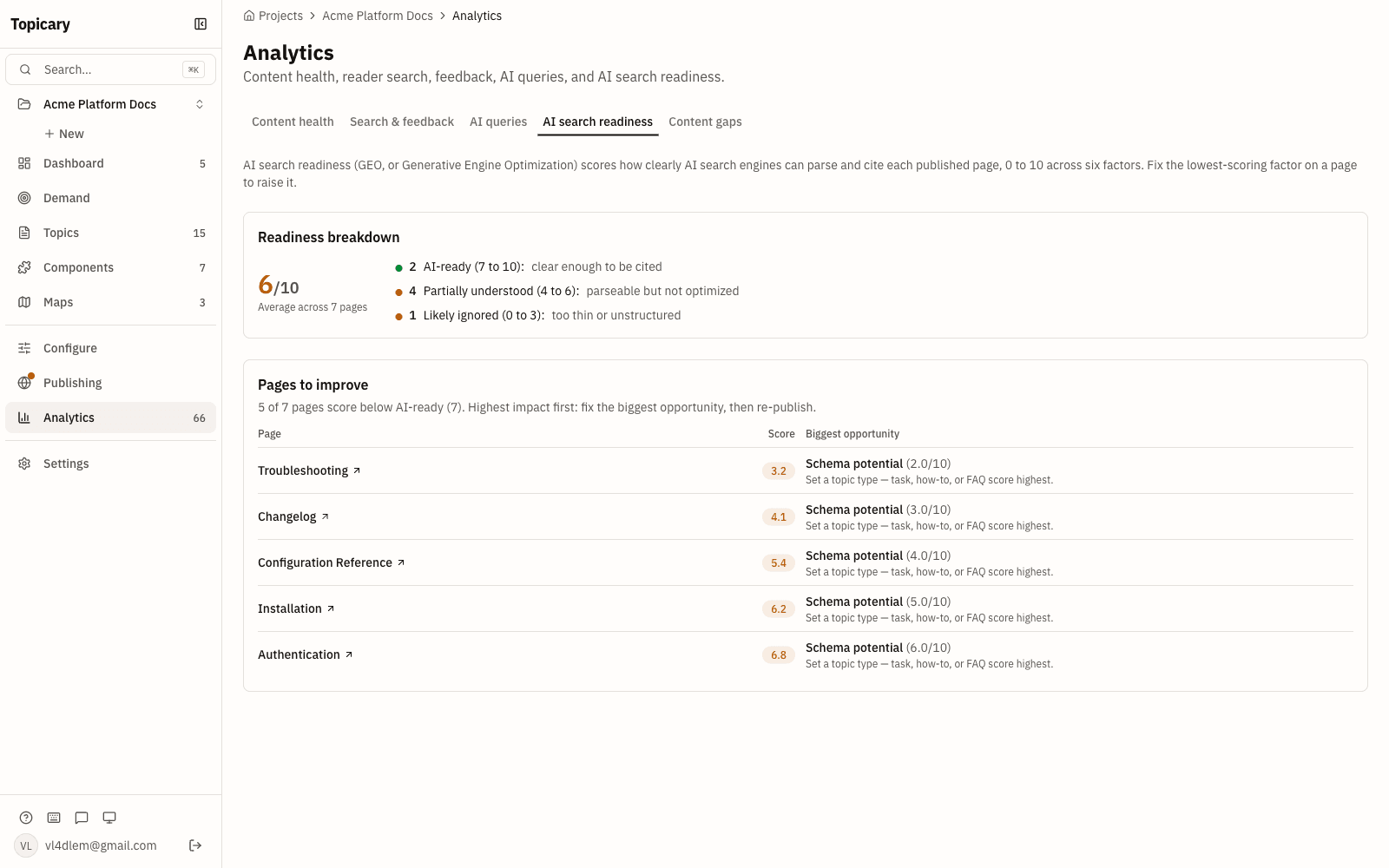
Topicary ships new capability regularly and watches your content for decay; RoboHelp does neither.
Topicary flags stale topics, orphaned components, and broken references without being asked. Every published site generates llms.txt, llms-full.txt, clean .md URLs, and an AI query endpoint. Assistants retrieve and cite the content cleanly. This matters more each quarter. GitBook reported that AI systems made under 10% of documentation reads in January 2025. By December 2025 the share was 41% (GitBook AI docs data, checked July 2026). RoboHelp has no content-health checks and no built-in LLM-ready output. Its release history shows no sign that either is coming. A tool's rate of investment is a feature. On that measure, the two are moving in opposite directions.
Who should stay on RoboHelp, and who should move
The main question is whether your needs are already met or still growing, because RoboHelp is a fixed target while Topicary is still moving.
The clearest signal to stay is a settled workflow that RoboHelp already covers. Maintenance mode is not a problem when the tool already does the job. Desktop help or CHM output, ServiceNow or SharePoint targets, a reuse model that works: RoboHelp covers all of it. A tool that does the job does not need new features to keep doing it. RoboHelp's publishing reach is the single strongest reason to stay. No other tool in the category publishes to as broad a set of destinations from one authoring app. Cross-platform desktop support and the $39.99 solo price reinforce that fit. It suits an individual writer who already hosts output.
The clearest signal to move is a bet on where documentation is heading. The biggest gap is AI. RoboHelp has none, in authoring or in output. Adobe's investment goes to Experience Manager Guides instead. The second gap is collaboration. A single-author desktop model with Git for versioning fits developers better than writers. The third is hosting, which RoboHelp leaves to you while Topicary includes it. You are picking a platform for the next five years. We recommend weighing the vendor's rate of investment as heavily as the current feature list. The tool you buy today is the tool you are betting on for the decade.
A blended approach works here too. A team can keep RoboHelp for a legacy CHM or context-sensitive-help deliverable. The web help center moves to a cloud tool. No rule says every output must run through one desktop application. Divide the work by output type instead of by habit. That usually lowers both cost and maintenance load.
Migration path
RoboHelp does not export to a Topicary-native format, so the move runs through HTML. RoboHelp topics are HTML and XHTML, which Topicary imports.
Export your project to HTML, then import it into Topicary. Snippets map to components, condition tags map to conditions, and variables map to variables. Review heading structure, reconnect component references, and check that condition expressions carried across.
HTML export flattens condition tags and snippet boundaries into plain markup. Reuse is the part to rebuild deliberately after import. Reconnect components, conditions, and variables rather than expecting them to carry across. Beyond that, plan to rebuild three things by hand. The skin or theme goes first, because Topicary uses hosted templates rather than RoboHelp skins. The table of contents becomes a Topicary map. Context-sensitive help mapping has no cloud equivalent at all. Set up the hosting target after the content arrives, then connect a custom domain. Confirm search and the AI chat widget work against real pages. Do that before you retire the RoboHelp project. That verification step is the one teams skip and regret. A broken cross-reference is cheap to fix during migration and expensive to find after launch. RoboHelp-specific constructs do not transfer. Skins, CHM output, context-sensitive help map IDs, and interactive widgets need re-expression in the hosted output. Drop the ones that no longer apply.
Budget for a review phase rather than a one-click import. For a mid-sized project, plan a few days. That covers verifying structure, rebuilding the publishing target, and setting up hosting. Teams evaluating RoboHelp usually weigh it against the other desktop tools too. The MadCap Flare comparison and the Adobe FrameMaker comparison cover the two most common alternatives. The help authoring tools roundup puts all seven options side by side. For the structured-authoring model behind Topicary, see structured authoring without XML.
Disclosure: This page is published by Topicary. I compete with Adobe RoboHelp. RoboHelp claims here draw on Adobe's official pages and documented release notes. If you find an error, email support@topicary.com and I will correct it within 24 hours.