Topicary vs Mintlify: structured authoring vs developer docs
If Mintlify's pricing is what sent you looking, you are in a common spot. Mintlify's free Starter plan is generous, the full platform, a custom domain, an MCP server, and AI on a credit allowance, at no cost. The jump comes next: the paid Pro tier is $450 a month billed annually ($540 month-to-month), and what it buys is AI capacity, the Agent, Assistant, and Automations, priced around usage credits. SSO, advanced auth, personalization, and PDF export sit above even that, on Enterprise, a custom quote. Before you switch, the honest question is what you are actually leaving for:
- If you just want a cheaper Mintlify-style site (the same clean MDX docs and API playground, a smaller bill) you probably don't need a CCMS. Open-source fumadocs (MDX, API playground, self-hosted) or MkDocs will get you there. We'd rather tell you that than sell you the wrong tool.
- If you've outgrown "API docs for one audience" (you need to reuse content with tracking, split it by audience or platform, ship a branded PDF, or import from DITA or Flare) that's a structured-content problem Mintlify doesn't solve at any tier. That's what this page is about.
Mintlify is a developer documentation platform built around MDX, Git workflows, and API reference. Topicary is a CCMS built around content reuse, conditional publishing, and multi-format output.
Mintlify is excellent at what it does: clean API docs, interactive playgrounds, AI-powered maintenance. But it is not a CCMS. This page explains the architectural differences and maps when each tool is the right choice.
At a glance
Category
Topicary
Component CCMS (structured authoring)Mintlify
Developer docs platform (MDX + Git)Best for
Topicary
Multi-audience docs, multi-format deliveryMintlify
API reference, SDK guides, developer portalsContent reuse
Topicary
Components with where-used tracking + orphan detectionMintlify
MDX snippet imports, no trackingConditions
Topicary
Publish-time filtering for separate deliverablesMintlify
Visitor-side Personalization (Enterprise); no author-side filteringVariables
Topicary
Named sets with publish-time switchingMintlify
Snippet props (per-import)Topicary
All paid plans: branded cover, TOC, running headersMintlify
Enterprise only: basic, email deliveryImport
Topicary
7 formats incl. DITA, Flare, OpenAPIMintlify
Markdown/MDX + migration from Docusaurus/ReadMe/GitBookPricing
Topicary
Flat: $0 / $79 / $149Mintlify
$0 Starter, $450/mo Pro, Enterprise customFilled marker = leads this capability. Even rows are unmarked.
Why teams look for a Mintlify alternative in 2026
Two reasons show up in "mintlify alternative" threads, and they point to different answers.
The price jump. Mintlify's free Starter tier is genuinely good, which is what makes the next step notable: the paid Pro tier is $450 a month billed annually, a large step up from free, and it is priced around AI-agent usage credits. SSO, advanced auth, personalization, and PDF export all sit on Enterprise above it, behind a sales call. For a small team that wants component reuse and conditional publishing more than an AI agent, $450 a month buys a lot of capability aimed at a different job.
If that is you, be honest with yourself: a cheaper developer-docs tool is the fix, not a CCMS. Open-source fumadocs and MkDocs cover clean MDX docs and an API playground at zero hosting cost, and a handful of budget hosts will run your existing Mintlify-style repo. Switching to a CCMS to save money on API docs would be the wrong move, and I would rather you land somewhere that fits.
The category boundary. The other group is not leaving over price. They have hit the edge of what a developer-docs platform does. They are pasting the same passage across SDK guides, need a Windows path and a Linux path from one source, have to ship a branded PDF for a customer, or are folding in content from DITA or Flare. As of July 2026, Mintlify has no content reuse with where-used tracking, no author-side conditional publishing, and no variable sets, and its PDF export is basic and Enterprise-only. That is not a pricing gap; it is a CCMS gap, and it is the rest of this page.
2 different categories of tool
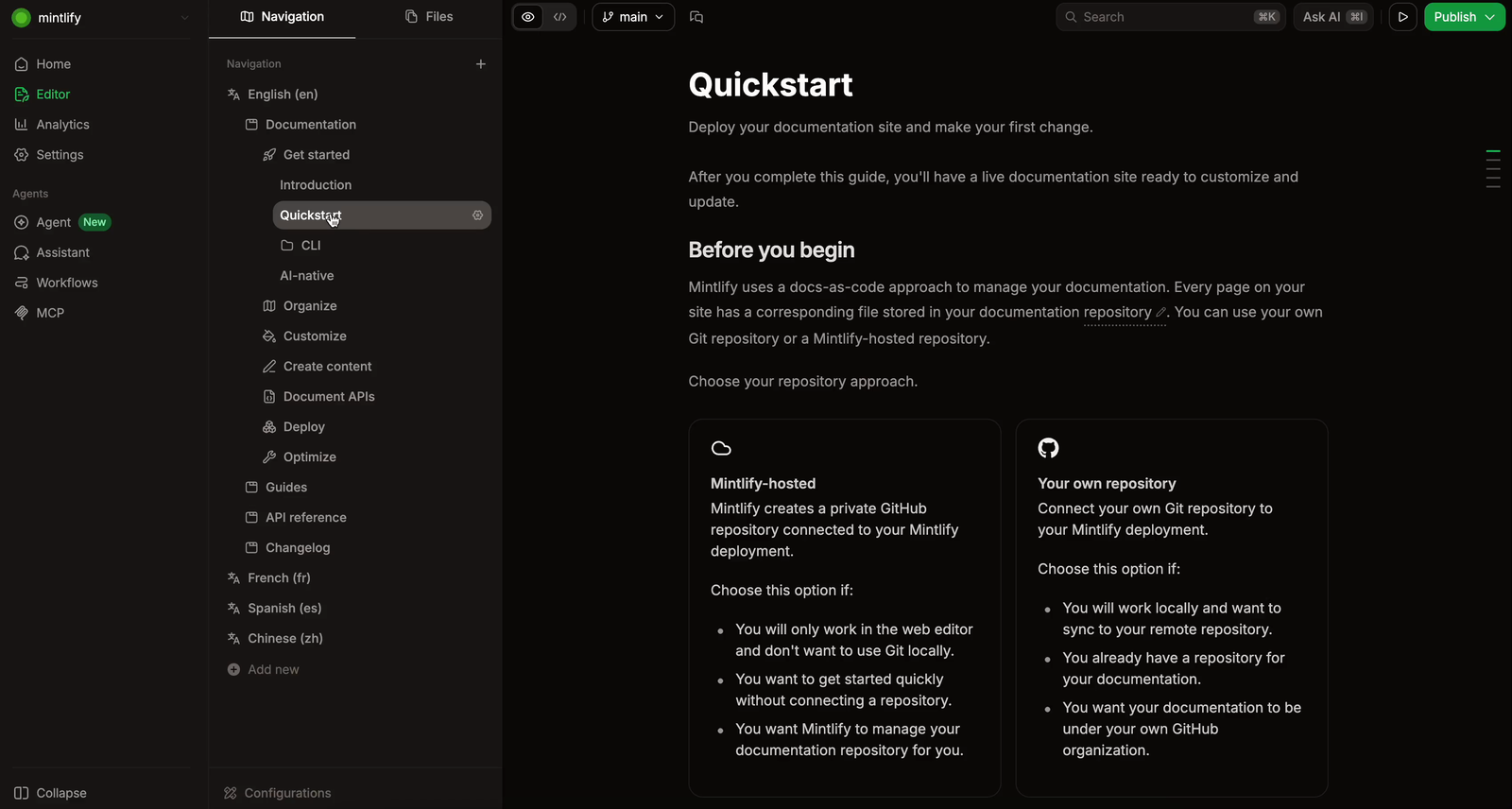
Mintlify is a developer docs platform. Content lives as MDX files in Git. Writers author in code editors or Mintlify's web editor. Output is a single web docs site for developers reading API reference, SDK guides, and integration tutorials.
Topicary is a CCMS. Content lives as structured topics with reusable components, conditional blocks, and variables. Output can be web, PDF, or Markdown, filtered and customized per deliverable. The audience is broader: end users, administrators, developers, partners, all from the same source.
Most "mintlify alternative" articles compare Mintlify to GitBook, ReadMe, Docusaurus, Scalar, other developer docs tools. This page makes a different comparison: what happens when your requirements outgrow a developer docs platform?
Feature comparison
Content reuse
Topicary
Components with where-used tracking, orphan detection, save-from-selection; work with conditionsMintlify
Snippets: MDX file imports with props. No tracking, no orphan detectionConditional content
Topicary
Dimensions + values, block-level include/exclude, editor preview, publish-time filtering, all paid plansMintlify
Visitor-side Personalization (Enterprise, auth-group based); no author-side publish-time profilingVariables
Topicary
Variable sets with key-value pairs, default set selection, replaced at publish time across all formatsMintlify
Snippet props (per-import values). No global sets, no publish-time switchingEditor
Topicary
Block editor with slash commands, bubble toolbar, keyboard shortcuts; AI assistant on all paid plansMintlify
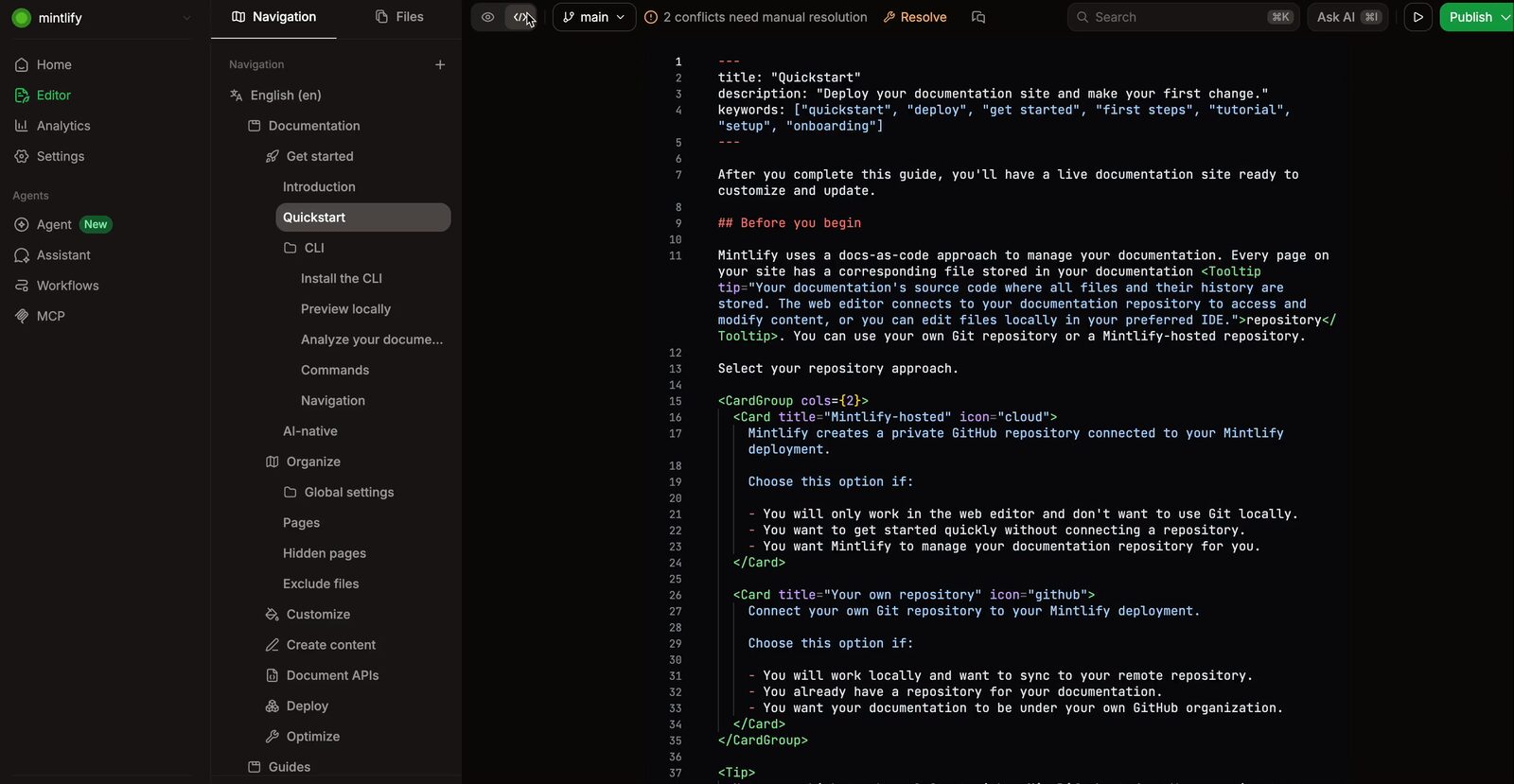
MDX in code editor or web editor, custom React components, preview deployments, grammar checksAPI docs
Topicary
OpenAPI 3.x import to structured reference with method badges, parameter tables, Try It panels. No auto-generationMintlify
Interactive playground with live responses, bearer/basic/API key auth, auto-generated code samplesWeb publishing
Topicary
Hosted sites, custom domains (Team+), dark mode, full-text + AI search, reader feedback, custom CSSMintlify
Hosted sites, custom domains (all plans incl. free), SEO/GEO optimizations, AI searchTopicary
All paid plans. Branded cover, TOC with dot leaders, running headers, custom footer, configurable fontsMintlify
Enterprise only (pricing matrix and PDF docs agree). Email delivery, navigable TOC, page-number footer; full-site PDF bypasses access controlsImport
Topicary
7 formats: Markdown, HTML, DITA, Confluence, Flare, Word, OpenAPI. Drag-drop with auto-detectionMintlify
MDX/Markdown. Automated migration from Docusaurus, ReadMe, GitBookAI features
Topicary
AI writing assistant (draft, rewrite, expand, summarize, improve), AI search on published sites, code-change watching (merged PRs surface as worklist items)Mintlify
AI agent opens GitHub PRs, reads CI checks and PR comments, Slack agent, AGENTS.md instructions. Assistant, AI search, grammar checksVersioning
Topicary
Publication versioning: parallel versions with independent publishing, reader version switcher, block-level diffMintlify
Folder-based: v1/v2 directories with separate nav groupsReview
Topicary
Token-based: unique link, no login, inline comments, approve/reject, no per-reviewer chargeMintlify
No built-in SME review. Documentation review via Git PRsGit integration
Topicary
Bidirectional GitHub sync (push/pull with conflict detection). Content lives in database, not repoMintlify
Git-native: content lives in your repo. GitHub/GitLab sync. Preview deployments on PRsAnalytics
Topicary
Search queries, zero-result gaps, reader feedback per page, staleness flags, orphan detectionMintlify
Page views, AI assistant logs, search analytics, agent activity trackingFilled marker = leads this capability. Even rows are unmarked.
The deep dives below cover where each tool leads, and the trade-offs behind every marker above.
What Mintlify does better
4 areas where Mintlify has clear advantages, not minor for the right team.
API playground
For API reference, Mintlify's playground is more polished, with deeper auth configuration and code sample generation than Topicary's Try It panels.
Mintlify's interactive API playground lets developers test endpoints directly in docs:
- Live responses from real endpoints
- Auth configuration: bearer tokens, basic auth, API keys
- Auto-generated code samples per endpoint
- Tight integration with documentation structure
Try It panels ship for OpenAPI-imported endpoints, but Mintlify's playground has deeper auth configuration and code sample generation. For API reference as the primary output, Mintlify's playground is the more polished option.
AI-powered documentation maintenance
Both watch your codebase and draft doc updates when code ships. The difference is where the update lands: Mintlify opens a pull request in your repo; Topicary surfaces it as an item on the writer's demand worklist.
Mintlify's AI agent monitors your codebase and proposes doc updates when code ships:
- Full context of codebase and existing documentation (structure, tone, naming)
- When a PR changes an API endpoint, the agent drafts doc updates and opens a pull request under your GitHub account
- Reads PR comments, reviews, and CI checks, and runs in Slack with context from Notion, Linear, Jira, and Google Drive
- Customizable behavior via AGENTS.md (style guidelines, code example standards)
Topicary watches your source repo too: on a merged pull request it matches the changed files to affected topics and, where it can, drafts the doc edit (or flags the topic to verify), surfacing it as a "code change" item on the demand worklist for a writer to review and apply. The difference is where the work lands. Mintlify's agent opens a pull request under your GitHub account and lives in the developer's loop (PR comments, CI, Slack, Notion/Linear/Jira context); Topicary's suggestion lands in the CCMS for the writer to apply against the structured source. If you want code changes answered by an agent inside the code workflow, Mintlify goes deeper; if you want them triaged alongside reader gaps and staleness in one writer's worklist, that is Topicary's model.
Git-native workflow
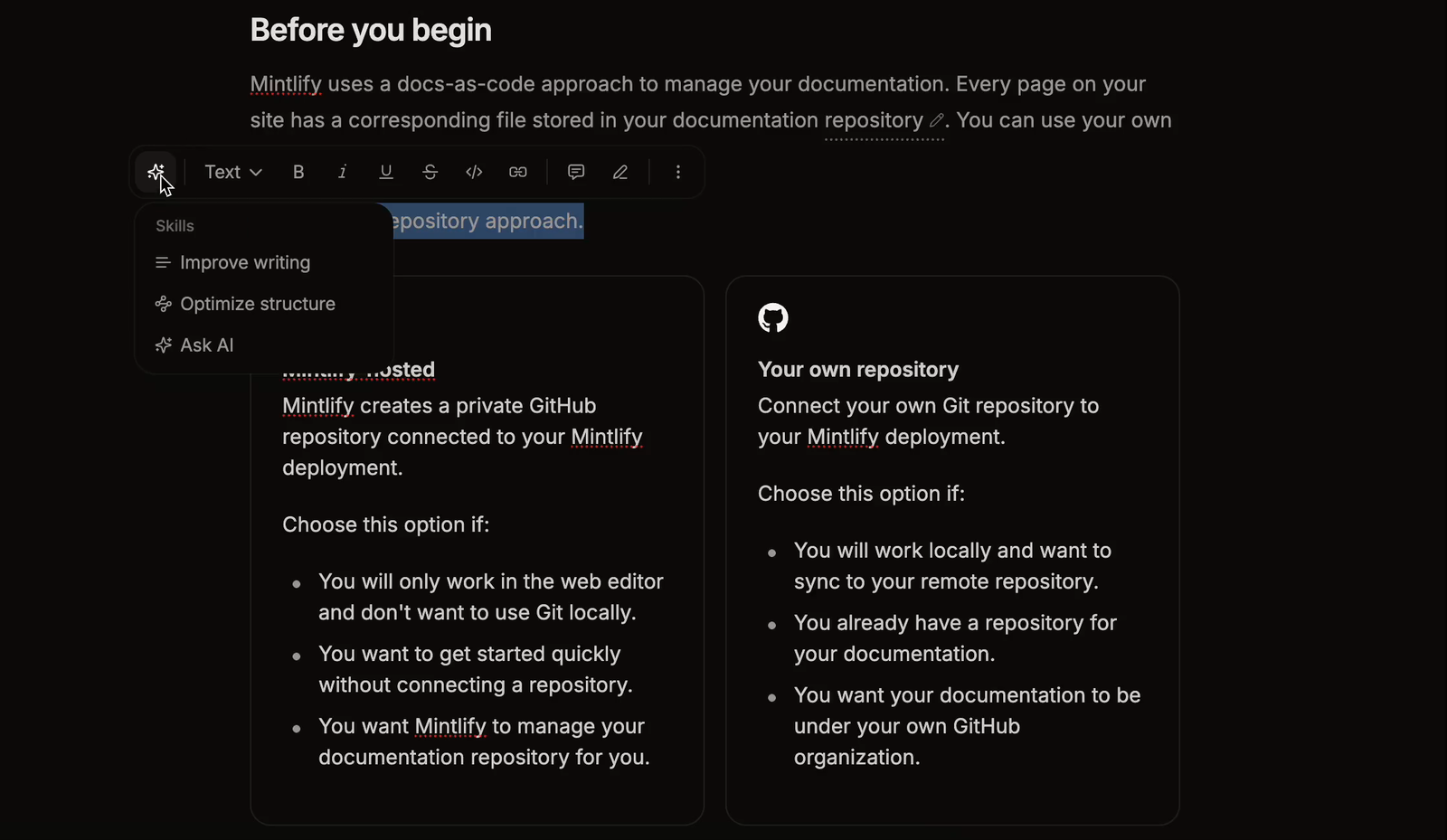
For all-developer teams, Mintlify's Git-native workflow with PR review and preview deployments has less friction than Topicary's GitHub sync.
| Mintlify | Topicary | |
|---|---|---|
| Source of truth | Git repository (MDX files) | Cloud database |
| Authoring | Any code editor (VS Code, Cursor, etc.) | Web editor |
| PR workflow | Native: docs changes go through code review | GitHub sync (push/pull), not Git-native |
| Preview deployments | On every PR | Not available |
For teams where every contributor is a developer comfortable with Git, Mintlify has less friction. For mixed teams, see docs-as-code limitations.
Custom domains on free tier and developer polish
Mintlify gives custom domains on every plan plus battle-tested developer polish; Topicary requires Team and is newer here.
Mintlify publishes to docs.yourcompany.com on every plan including free. Topicary requires Team. Beyond domains:
- Preview deployments on every PR
- Automatic grammar and spelling checks
- SEO/GEO optimizations built in
- Polished default design with dark mode, syntax highlighting, responsive layout
Topicary's published sites include dark mode, search, AI search, reader feedback, and custom CSS, but the developer-experience polish is newer and less battle-tested.
Where Topicary pulls ahead
6 capabilities separate a CCMS from a developer docs platform. These are absent, or far more limited, in Mintlify at every price tier.
Component reuse with where-used tracking
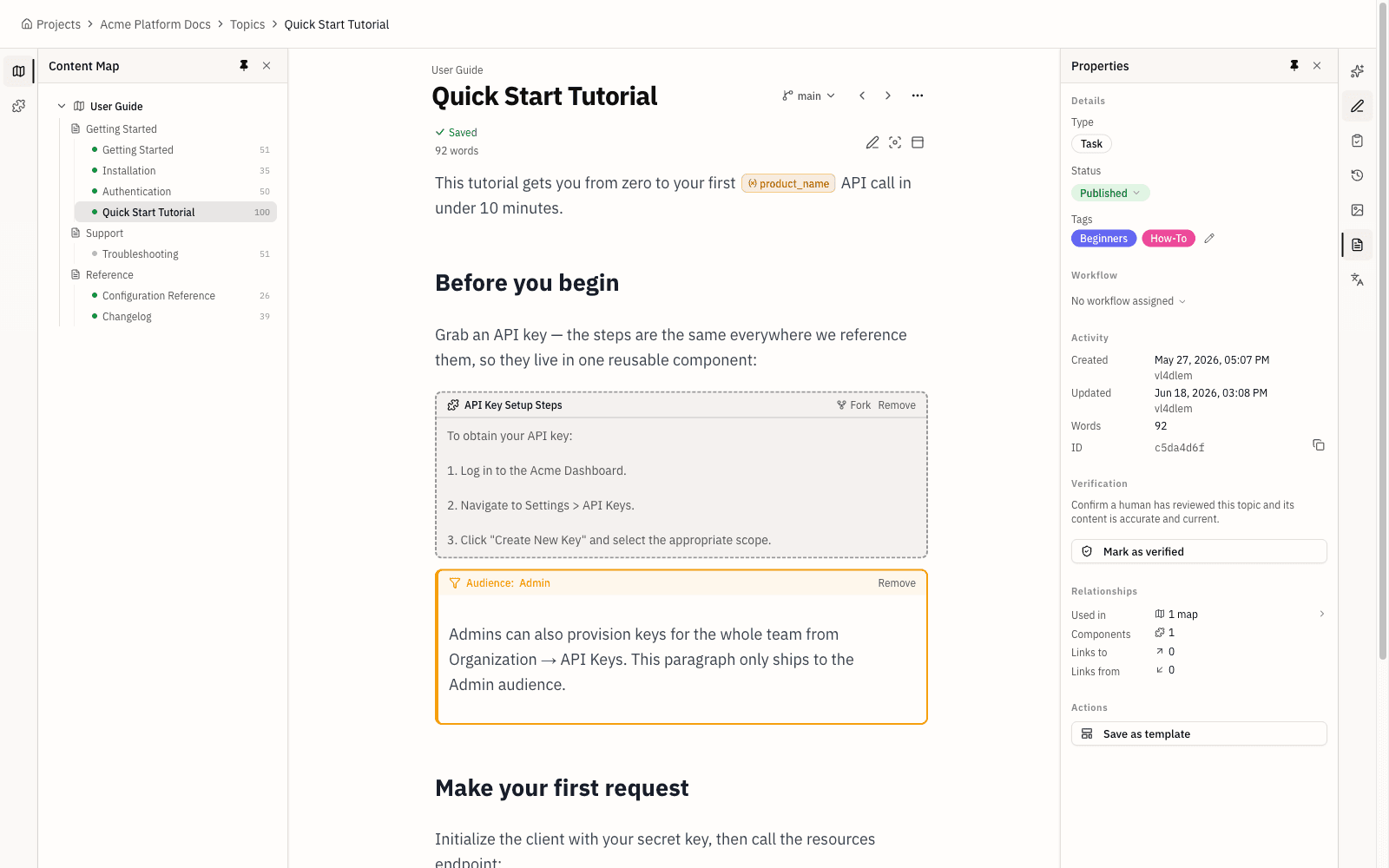
Topicary tracks where every component is used and flags orphans; Mintlify's file-based snippets leave you inspecting imports by hand.
| Mintlify | Topicary | |
|---|---|---|
| Mechanism | MDX file imports from snippets directory | Component model with reference tracking |
| Variable injection | Props per import | Named variable sets with publish-time switching |
| Where-used tracking | Not available (manual inspection) | Panel shows every topic using a component |
| Orphan detection | Not available | Flags saved-but-never-used components |
| Conditional integration | Not available | Components work with publish-time conditions |
At 10 snippets, Mintlify's file-based approach works. At 100 components across 300 topics, can you confidently edit a reusable block without breaking something you can't see?
Publish-time conditional content
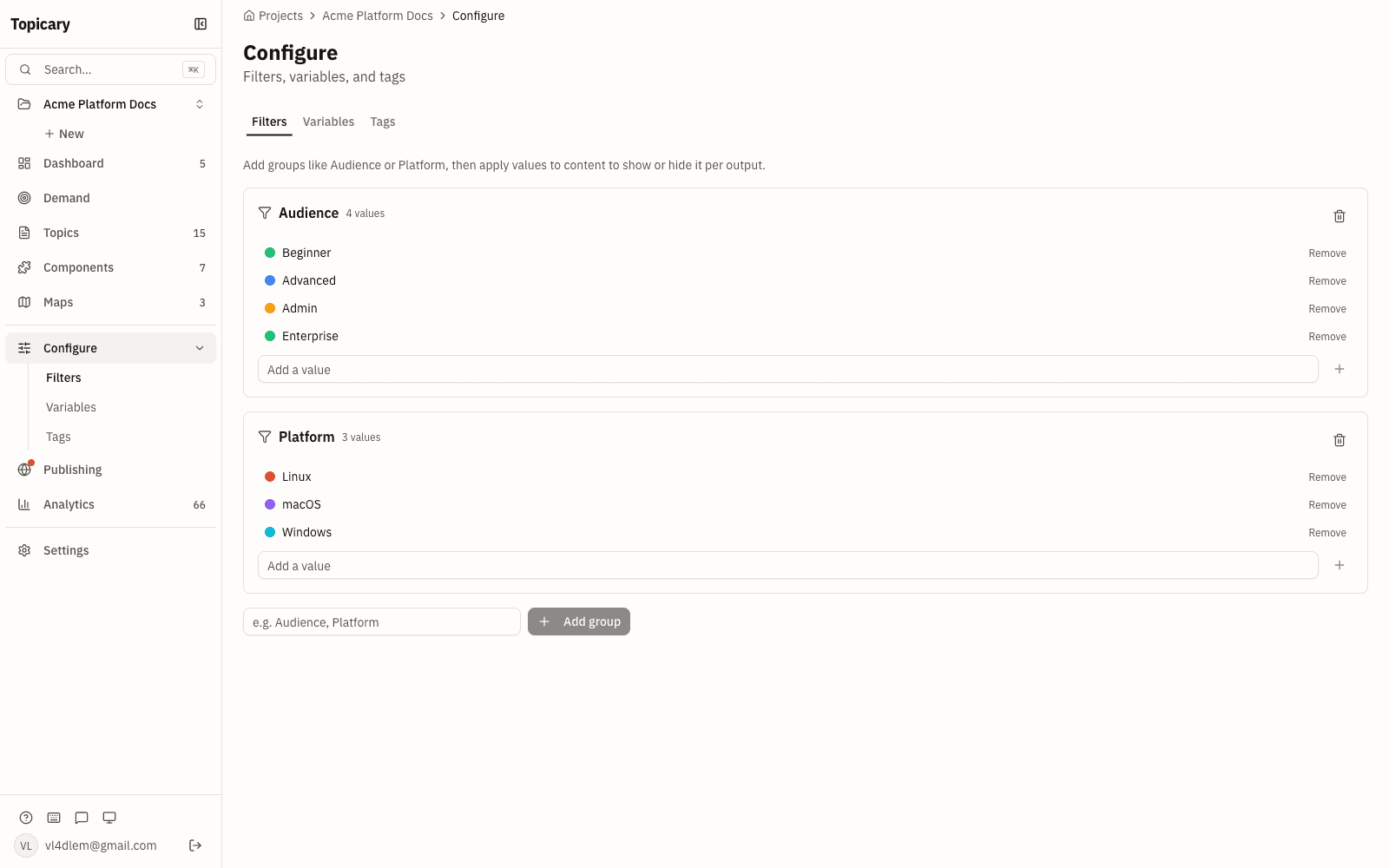
Topicary filters content by audience or platform into separate outputs at publish time; Mintlify's Personalization is visitor-side, not an author-side split into separate deliverables.
The architectural gap that defines the category difference. As of July 2026, Mintlify has no author-side conditional filtering that splits content into separate published outputs. Its Enterprise-tier Personalization shows or hides content for authenticated visitor groups at read time, which is a different mechanism from publishing distinct deliverables from one source.
Topicary lets you tag content blocks by audience, platform, product tier, or custom dimensions. Preview filtered in editor. At publish time: separate outputs with only relevant content.
Variable sets for multi-output delivery
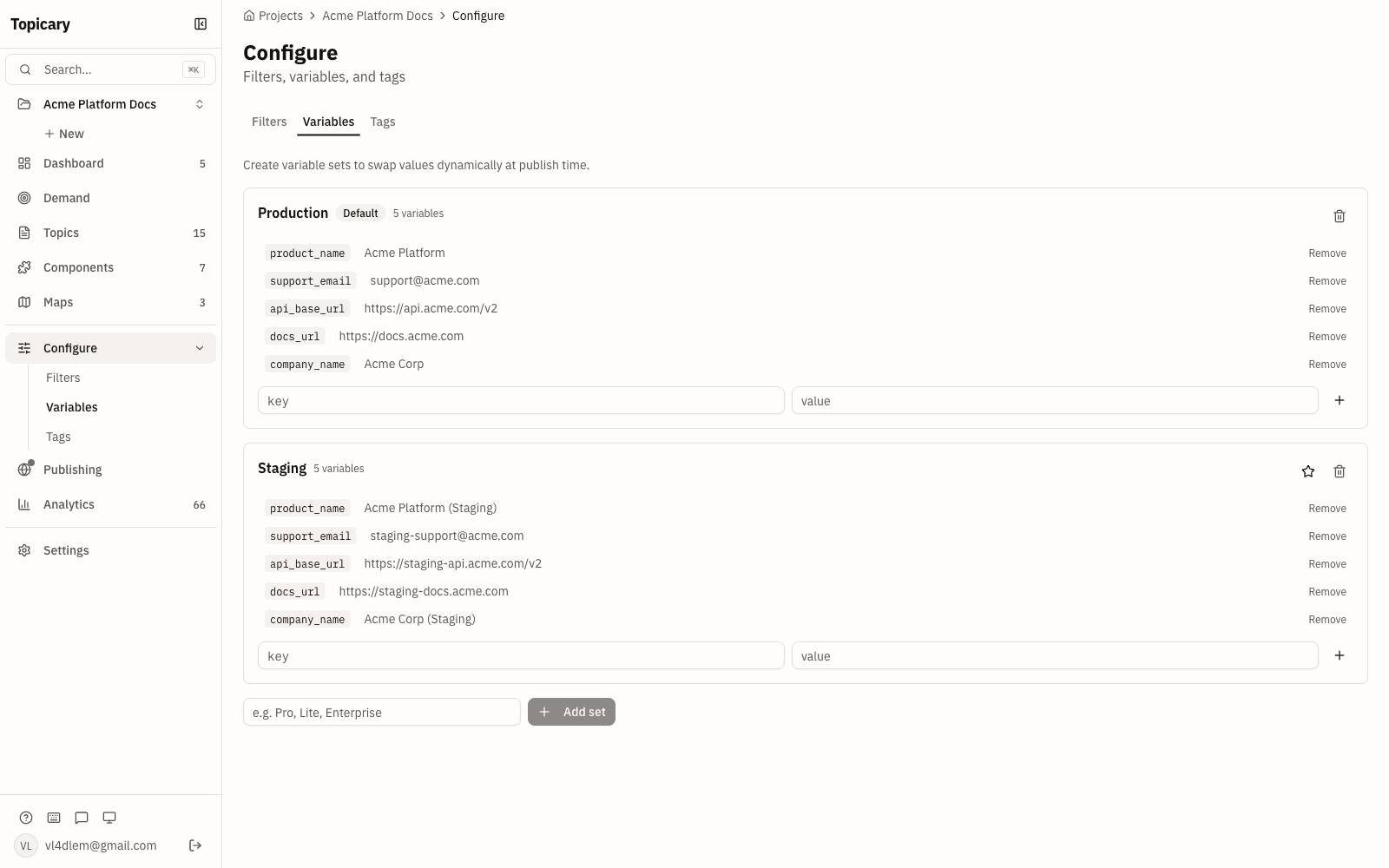
Topicary's named variable sets switch per target to white-label across web, PDF, and Markdown; Mintlify only offers per-import snippet props.
- Mintlify: Snippet props (per-import customization). No global variable system, no publish-time switching.
- Topicary: Named variable sets such as
{product_name},{support_email},{version}. Switch active set per publication target. White-label for 2 customers by swapping the set. Variables resolve during publishing across web, PDF, and Markdown simultaneously.
7-format import including DITA and Flare
Topicary imports DITA and Flare projects with structure intact; Mintlify requires flattening them to Markdown first, losing relationships.
| Source | Mintlify | Topicary |
|---|---|---|
| Docusaurus / ReadMe / GitBook | Automated migration tools | Not available |
| DITA (topics, maps, conrefs) | Convert to Markdown first | Direct import: hierarchy + components preserved |
| MadCap Flare (full project) | Convert to Markdown first | Direct: topics, snippets, TOC, variables, conditions |
| OpenAPI 3.x | Not available | Structured API reference topics |
A Flare project imported into Topicary retains snippets as components, TOC as maps, variables, and conditions. The same project imported into Mintlify arrives as flat Markdown with no structural relationships. See the Flare comparison.
PDF with full branding control
Topicary delivers branded PDF with cover, TOC, and headers on every paid plan; Mintlify's PDF is basic and its tier is ambiguous, Pro per the pricing page and Enterprise per its own docs.
| Mintlify | Topicary | |
|---|---|---|
| Availability | Enterprise only (pricing matrix and PDF docs agree) | All paid plans ($79/mo+) |
| Delivery | Email with download link | Instant download |
| Cover page | Not documented | Branded cover |
| TOC | Navigable, no page numbers | Page numbers + dot leaders |
| Running headers | Not documented | Per-topic |
| Conditions/variables | Not applicable | Resolve during generation |
| Access control | Full-site PDF bypasses restrictions | Respects auth |
SME review without logins
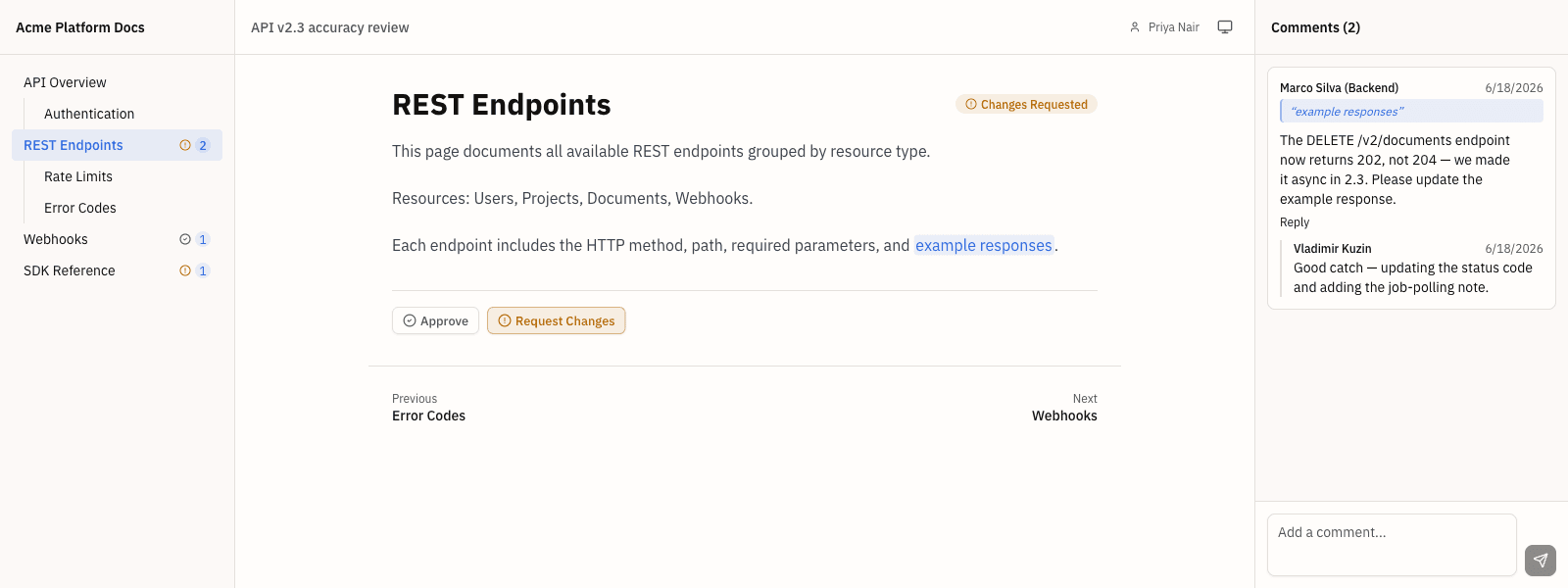
Topicary reviewers open a link with no account or charge; Mintlify routes review through Git PRs that require repo access.
- Topicary: Unique review links. No account, no login, no per-reviewer charge. Inline comments, approve/reject per topic.
- Mintlify: No built-in review workflow. Review happens via Git PRs, which require repo access and Git familiarity. For SMEs who are product managers or external partners, this is an access barrier.
Pricing at your team size
Mintlify publishes three plans: free Starter, Pro at $450 a month billed annually ($540 month-to-month), and custom-quote Enterprise. Pro buys AI capacity (Agent, Assistant, Automations, 10,000 credits a month); the paid features docs teams usually grow into, SSO, advanced auth, personalization, and PDF export, sit on Enterprise, so the comparison is less about per-writer math and more about the size of the jump and what each dollar buys:
| Need | Mintlify | Topicary |
|---|---|---|
| Solo / small team, web only | Free Starter (custom domain, API playground, MCP server, AI credits) | Free ($0, 1 author, 50 topics) or Pro ($79/mo) |
| 10 writers, flat | Pro $450/mo billed annually, plus usage credits | Team ($149/mo, up to 10 authors) |
| PDF export | Enterprise, custom quote | All paid plans, from $79/mo |
| SSO / SAML | Enterprise, custom quote | Team ($149/mo) |
| Advanced auth | Password auth on Pro; OAuth/JWT/SSO on Enterprise | Published-site password (all) + SSO on Team |
Mintlify pricing: mintlify.com/pricing, checked July 28, 2026 (Starter $0, Pro $450/mo billed annually, Enterprise custom). Topicary is free during beta, join here.
Mintlify's free Starter plan is genuinely strong for a solo developer: the full platform, a custom domain, the API playground, an MCP server, and an AI credit allowance at no cost. The gap is the jump to paid: Pro is $450 a month billed annually and priced around AI-agent usage, aimed at teams that want the agent, the assistant, and developer-docs polish. Topicary's paid plans buy a different thing, conditional content, variable sets, branded PDF, 7-format import, and login-free SME review, at flat $79 and $149, with SSO and custom domain on Team.
Mintlify also offers a startup program with credits for eligible early-stage companies.
Who should use which tool
Choose Mintlify if:
- API reference and developer guides are your primary output
- Your team works in a Git-native, docs-as-code workflow
- You need an interactive API playground for endpoint testing
- Your content serves one audience on one web site
- Your writers are developers comfortable with MDX and code editors
- You want an AI agent that opens doc-update pull requests directly in your code workflow
Choose Topicary if:
- You reuse content across topics and need to know where every reference lives
- You publish different versions for different audiences or platforms
- You need PDF alongside web with full branding control
- You're migrating from DITA, MadCap Flare, Confluence, or another structured tool
- Your reviewers are SMEs who don't use Git and shouldn't need a login
- Your team includes non-developers who need a visual editor
Consider both if:
- You have API documentation (Mintlify) and product docs for multiple audiences (Topicary)
For a broader comparison, see the best technical writing software. For other developer docs platforms, see Topicary vs GitBook. For knowledge base alternatives, see Topicary vs Document360. For the problem both tools solve from different angles, read why I built Topicary.