Topicary vs GitBook
If GitBook's pricing change is what brought you here, you're not alone. GitBook moved from a generous free tier to per-site ($65 to $249/mo) plus per-user ($12/mo) billing. Teams have been openly looking for the exit ever since. One user described their bill going from $16/mo to $109/mo for the same docs. Be honest about why you are leaving. The reason decides where you should end up:
- If you just want a cheaper hosted docs site that looks roughly like GitBook or Mintlify, you may not need a CCMS at all. A static-site generator like fumadocs or MkDocs will do the job. So will a budget host. We would rather point you there than oversell you.
- If GitBook stopped scaling with your content, that is not a hosting problem. Maybe you paste the same warning across 10 pages. Maybe you cannot split content by audience or platform. Maybe you need a PDF and a portal and in-app help from one source. That is a structure problem. This page is about structure.
GitBook is a documentation platform for developer docs: clean editor, fast onboarding, templates, and GitBook Agent. Topicary is a CCMS for structured authoring: content reuse with tracking, author-side conditional content, variable sets, multi-format output. Both now offer real-time collaboration, custom domains, bidirectional GitHub sync, and MCP servers.
Put plainly: GitBook is a wiki with an AI layer, and Topicary is a CCMS with one. The difference is architectural, and it explains every gap on this page. A wiki stores pages. A CCMS manages components and tracks how they connect. It also watches them for staleness, near-duplicates, and terminology drift, so the docs stay honest as they grow. Pick the wiki when your docs are one audience on one website. Pick the CCMS when they are not.
GitBook scores 4.8/5 on G2 (183 reviews); reviewers praise the editor and onboarding. The friction shows up in billing, not in the product. Trustpilot and Reddit carry repeated reports of post-cancellation charges and refund difficulty. Those reports track the pricing changes pushing this very migration.
At a glance
Category
Topicary
Component CCMS (structured authoring)GitBook
Documentation platform (wiki-style)Content reuse
Topicary
Components with where-used tracking + orphan detectionGitBook
Reusable blocks (no where-used tracking)Conditions
Topicary
Publish-time filtering (every plan, Free included)GitBook
Adaptive Content (visitor-side, Ultimate $249/site/mo)Variables
Topicary
Named sets with publish-time switchingGitBook
Page/space-scoped, no named setsTopicary
Every plan: branded cover, TOC, running headersGitBook
Essential/Ultimate: limited formatting, 400-page capImport
Topicary
7 formats incl. DITA, Flare, OpenAPI (no page limit)GitBook
Markdown, HTML, Word + Notion/Confluence (20-page limit)Price (5 writers)
Topicary
$149/mo (Team: up to 10 writers)GitBook
$125/mo (Essential: $65/site + $12 x 5 users)LLM-ready
Topicary
llms.txt, .md URLs, ?ask=, MCP server, AI analyticsGitBook
llms.txt, .md URLs, ?ask=, MCP server, GitBook AgentFilled marker = leads this capability. Even rows are unmarked.
Why teams are leaving GitBook in 2026
Two separate pressures show up again and again in migration threads on r/KnowledgeBaseSoftware and in review sites.
The pricing change. GitBook retired its old generous free tier and moved to per-site + per-user billing. Small teams had quietly run docs for a few dollars a month. Their renewals jumped. Reviewers describe "drastic pricing shifts," continued billing after cancellation, and difficulty getting refunds. This is the wave most people are riding right now.
The scale ceiling. A widely-cited DEV Community post-mortem documented 7 failure modes as documentation grew on a wiki-style tool. It named no content reuse, no conditional publishing, no multi-format output, and export requiring custom tooling. Multiple reports also describe GitBook's search and performance degrading past 100 to 200 pages.
The honest read: any cheaper host solves the first pressure. The second one only moves when you change what kind of tool you use. If both are true for you, that is the case for a CCMS. Teams leave GitBook over price. Structure is why they should weigh a CCMS over another wiki.
GitBook has grown, and its gaps have shifted
GitBook in 2024 and GitBook today are different products. 3 additions matter:
Reusable content blocks
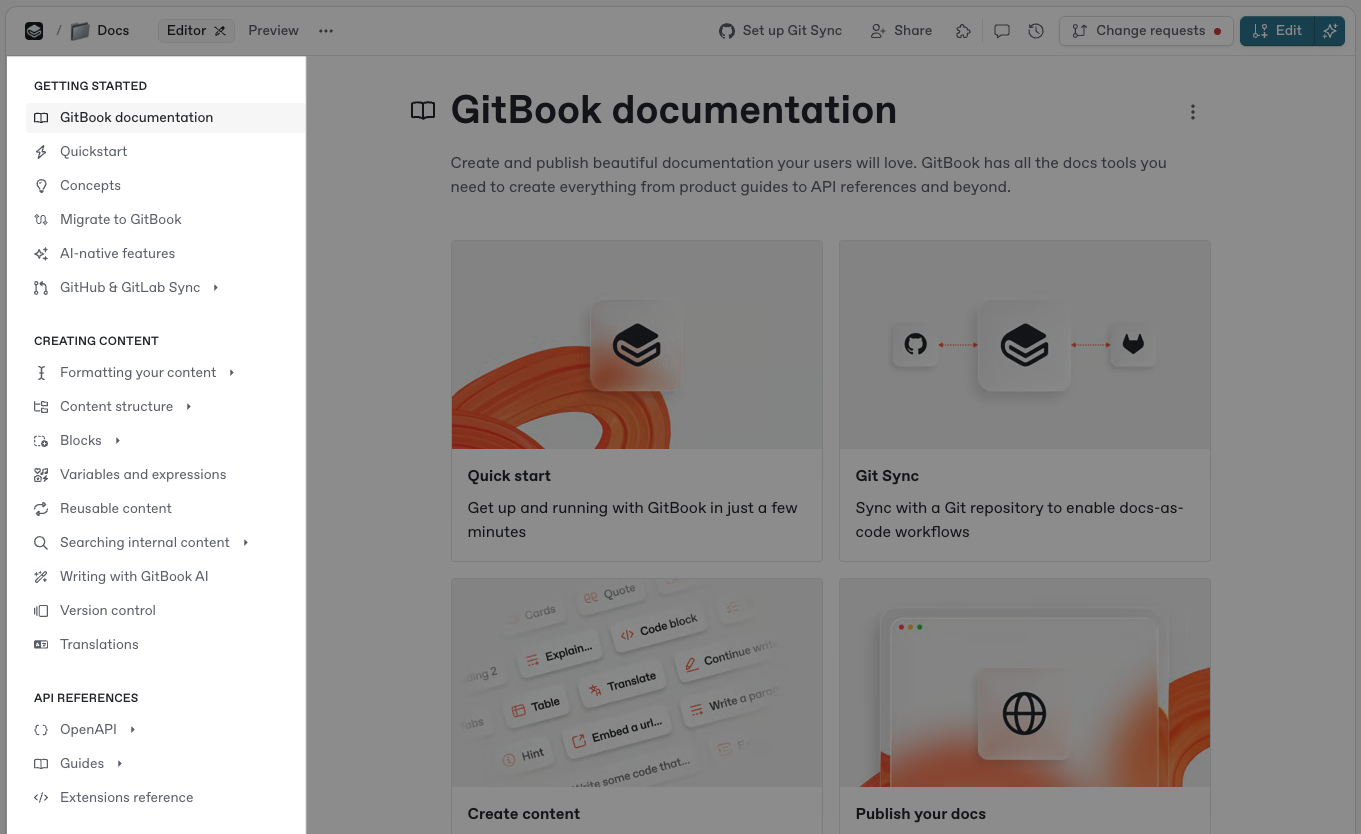
GitBook now has real organization-wide reusable blocks, but no where-used tracking, no orphan detection, and no link to conditional logic.
GitBook now supports organization-wide reusable content. Create a block, insert it anywhere, edit the source, and every instance updates. That is genuine content reuse. The limitations:
- No where-used tracking (you cannot see which pages reference a block before editing)
- No orphan detection
- Reusable content is not integrated with conditional logic
Variables and expressions
GitBook has page and space-scoped variables, but they cannot appear in titles, form named sets, or resolve during multi-output publishing.
GitBook supports page-scoped and space-scoped variables, referenced inline through expressions. The limitations:
- Cannot appear in page titles or metadata (GitBook docs)
- No named variable sets (no "Product A" set vs "Product B" set)
- Variables resolve in the editor, not during multi-output publishing
Adaptive Content (conditional)
GitBook's Adaptive Content personalizes visitor-side on Ultimate, fundamentally different from CCMS conditions that filter at publish time into separate deliverables.
GitBook's conditional content shows or hides sections based on visitor claims: cookies, URL parameters, or auth tokens from providers like Auth0 and Okta. This is visitor-side personalization. The reader's browser determines visibility.
Requires Ultimate ($249/site/mo). CCMS conditions are architecturally different. They filter at publish time to produce separate deliverables.
These features close the "does it exist?" question. The "how deep does it go?" question is where the tools diverge. GitBook has addressed reuse since the post-mortem above. The gaps in conditional publishing, multi-format output, and export remain.
Feature comparison
Content reuse
Topicary
Components with where-used tracking and orphan detection; components work with conditionsGitBook
Organization-wide reusable blocks; no where-used tracking, orphan detection, or conditional integrationConditional content
Topicary
Dimensions + values, block-level include/exclude, editor preview, filter at publish time, every planGitBook
Adaptive Content: visitor-side (cookies, URL params, auth tokens), Ultimate only ($249/site/mo)Variables
Topicary
Variable sets with key-value pairs, default set selection, replaced at publish time across all formatsGitBook
Page/space-scoped, no named sets, no publish-time switchingEditor
Topicary
Block editor: slash commands, bubble toolbar, real-time co-editing (Yjs CRDT), AI on every planGitBook
Block editor with real-time collaboration, Markdown shortcuts, AI writing (Essential+)Web publishing
Topicary
Hosted sites, custom domains (Team+), dark mode, full-text + AI search, reader feedback, custom CSSGitBook
Hosted sites, custom domains (Essential+), clean default theme, AI search (Essential+)PDF output
Topicary
Every plan: branded cover, TOC with dot leaders, running headers, custom footer, configurable fontsGitBook
Essential/Ultimate, limited formatting, reported 400-page capMarkdown export
Topicary
Single topic or full map as zip, one clickGitBook
No direct button (requires Git Sync); some custom blocks export as HTMLImport formats
Topicary
7 formats: Markdown, HTML, DITA, Confluence, Flare, Word, OpenAPI; drag-drop, no page limitGitBook
Markdown, HTML, Word + Notion/Confluence/GitHub Wiki/Quip/etc.; max 20 pages per uploadCross-references
Topicary
TopicLink atoms with auto-resolution at publish time; survive renamesGitBook
Internal page links; break if target is moved or renamedVersion control
Topicary
Version history with block-level diff; publication versioning with reader version switcherGitBook
Change requests (draft/merge), Git-based versioningReview workflow
Topicary
Token-based SME review (Team): unique link, no login, inline comments, approve/reject, email notifications, no per-reviewer chargeGitBook
Comments on pages; requires GitBook account ($12/user/mo); no email notificationsGitHub sync
Topicary
Bidirectional: push/pull with conflict detection and resolution (Business plan)GitBook
Bidirectional: edit in GitBook or repoOnboarding
Topicary
Create project, import or author, configure target (more steps)GitBook
Template center, instant setup, live docs in under 10 minutesAI assistant
Topicary
AI query analytics, content gap detection, crawler tracking on every planGitBook
GitBook Agent: drafts and reviews change requests, lints against your style guide, translates; in beta, proposes updates from support ticketsAnalytics
Topicary
Search queries, zero-result gaps, reader feedback, staleness flags, orphan detection, AI query analytics, crawler trackingGitBook
Page views (all plans), search analytics (Essential+); AI Insights: user questions, crawler tracking (Ultimate)LLM-ready
Topicary
llms.txt, llms-full.txt, .md URLs, sitemap.md, smart 404, ?ask= (plan-gated), MCP server, automatic on all sitesGitBook
Full stack: llms.txt, llms-full.txt, .md URLs, sitemap.md, smart 404, ?ask=, MCP serverCustom domains
Topicary
TeamGitBook
Essential and UltimateFilled marker = leads this capability. Even rows are unmarked.
The deep dives below cover where each tool leads, and the trade-offs behind every marker above.
What GitBook does better
3 areas where GitBook has clear advantages. If those are what you care about, switching may not pay off.
Onboarding speed
GitBook has one of the fastest time-to-first-publish in the market: signup to live docs in under 10 minutes.
GitBook has one of the fastest time-to-first-publish in the market: template center, instant setup, no configuration. A developer can go from signup to live docs in under 10 minutes.
Topicary asks you to create a project, import or author content, and configure a publication target. More steps. More time.
GitBook Agent and AI ecosystem scale
AI infrastructure is comparable, but GitBook goes further with a mature documentation-aware AI assistant in GitBook Agent.
Both tools offer comparable AI infrastructure for published sites: llms.txt, llms-full.txt, .md URLs, sitemap.md, smart 404, ?ask= endpoints, and MCP servers. Where GitBook goes further:
- GitBook Agent: an AI teammate inside the editor. It opens change requests and explains its edits. It reviews them as a docs linter against your style guide. It also imports PDFs and Word files and keeps translations updated. In beta, it reads support conversations and tickets from connected tools to propose doc updates. Essential and higher plans include it; the Free plan caps it at 10 messages a week
- Scale data (GitBook's own usage data): 41% of documentation reads now by AI systems (up from under 10% in January 2025)
Topicary has AI query analytics, content gap detection (zero-result searches), and AI crawler tracking on every plan. Topicary does not ingest support tickets. If you want an AI teammate that drafts changes from your support queue, GitBook Agent is ahead.
Adaptive Content for authenticated audiences
For showing different content to different customer tiers on a live site, GitBook has a purpose-built identity-provider integration Topicary does not match.
GitBook's Adaptive Content (Ultimate plan) integrates with identity providers (Azure, Auth0, Okta) to personalize published docs based on authenticated user attributes.
Showing different content to different customer tiers on a live site is a purpose-built GitBook job. Topicary's conditions filter at publish time. They do not filter per visitor at view time.
Where Topicary pulls ahead
These are the gaps that turn "GitBook is getting expensive" into "GitBook can't do what we need." If you are leaving over price and recognize these pains, a CCMS is the upgrade, not a lateral move.
Component reuse with tracking
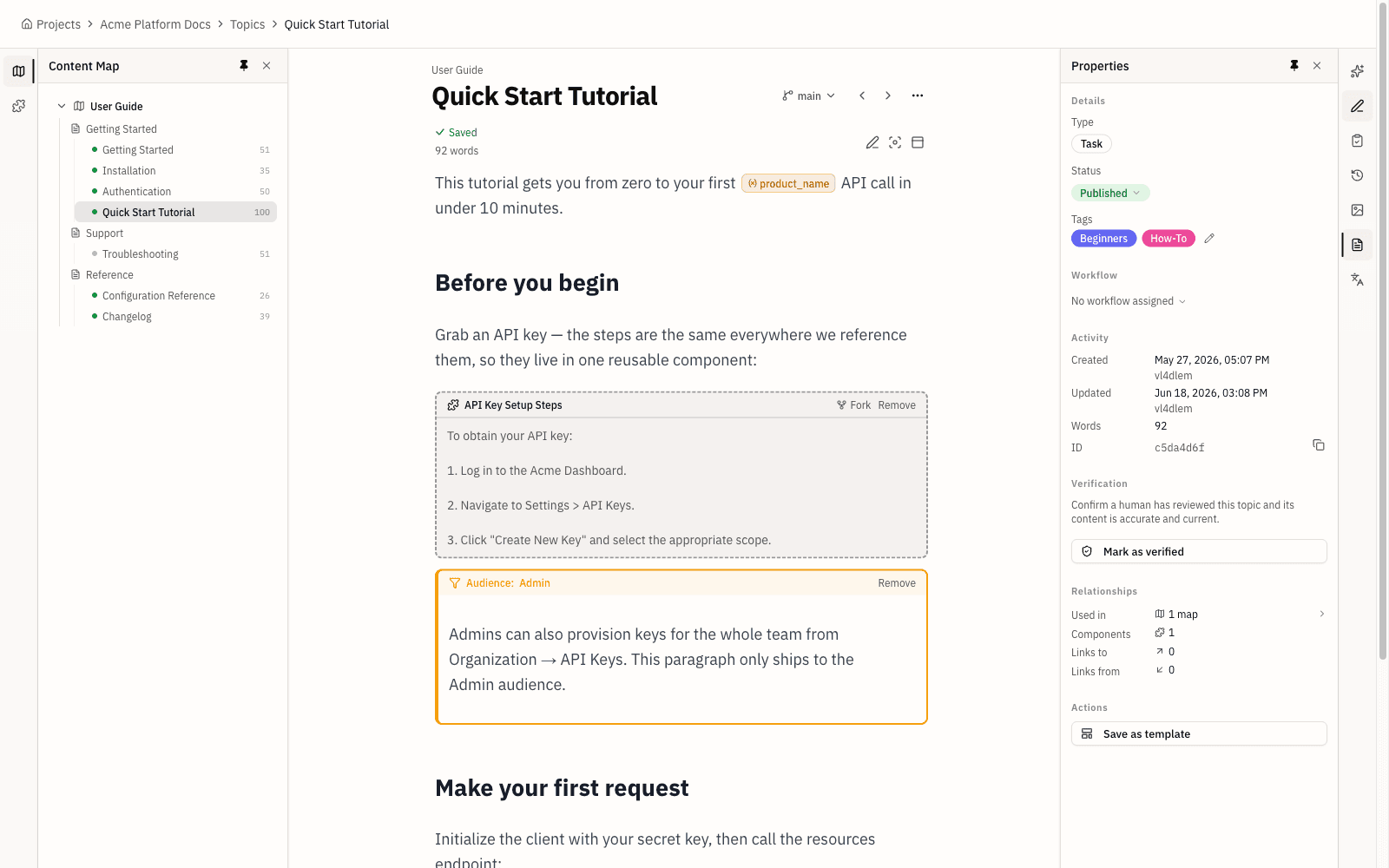
Topicary tracks where every component is used and flags orphans; GitBook propagates edits but gives no visibility before editing or deleting.
| GitBook | Topicary | |
|---|---|---|
| Reuse | Organization-wide blocks, edits propagate | Components with where-used tracking |
| Before editing | No visibility into which pages use a block | See every topic that references a component |
| Before deleting | No warning | Warning if referenced |
| Orphan detection | Not available | Flags unused components |
| Create from selection | Actions menu on selected blocks | "Save as component" from bubble toolbar |
At 20 reusable blocks, the difference is minor. At 200, tracking is the difference between confident editing and guesswork.
Author-side conditional content
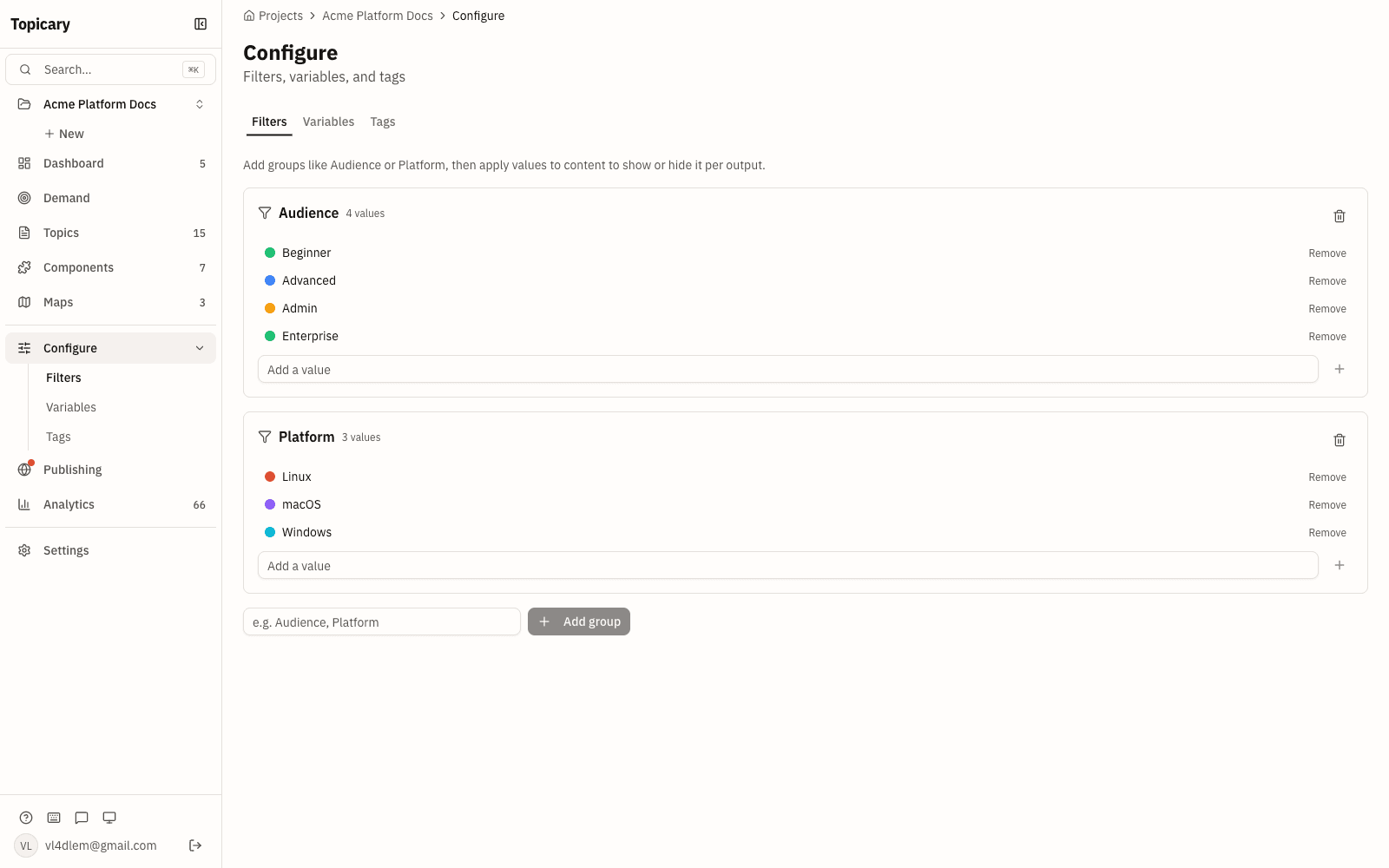
Topicary filters conditions at publish time to produce separate deliverables; GitBook only hides content view-side on the live site.
Topicary conditions work at authoring and publish time. Tag a paragraph for Windows, for macOS. Preview in editor. Publish separate outputs with only relevant content.
GitBook's Adaptive Content works at view time on the published site. Full content ships to the browser. JavaScript hides what does not match. That works for personalized sites. It does not produce separate deliverables (a Windows PDF, a Linux admin guide) from one source.
Variable sets for multi-output publishing
Topicary offers named variable sets you switch per publication target for white-labeling and multi-product docs; GitBook only substitutes single-site strings.
| GitBook | Topicary | |
|---|---|---|
| Scope | Page or space-scoped strings | Named sets with key-value pairs |
| Switching | No publish-time switching | Switch active set per publication target |
| Use cases | Single-site variable substitution | White-labeling, versioned guides, multi-product docs |
7-format import
Topicary imports DITA and MadCap Flare with no page limit; GitBook does not, and as of mid-2026 caps imports at 20 pages.
| Source | GitBook | Topicary |
|---|---|---|
| Markdown / HTML / Word | Yes | Yes |
| Notion / Confluence / GitHub Wiki | Yes | Confluence only |
| DITA (topics, maps, conrefs) | No | Yes (hierarchy + components preserved) |
| MadCap Flare (full project) | No | Yes (topics, snippets, TOC, variables, conditions) |
| OpenAPI 3.x | API reference pages generated from the spec | Yes (structured API reference topics) |
| Page limit per import | 20 pages | None |
For teams migrating from MadCap Flare or DITA, this is a one-step import vs a multi-step conversion pipeline. See the MadCap Flare comparison or the Flare migration guide.
SME review without logins
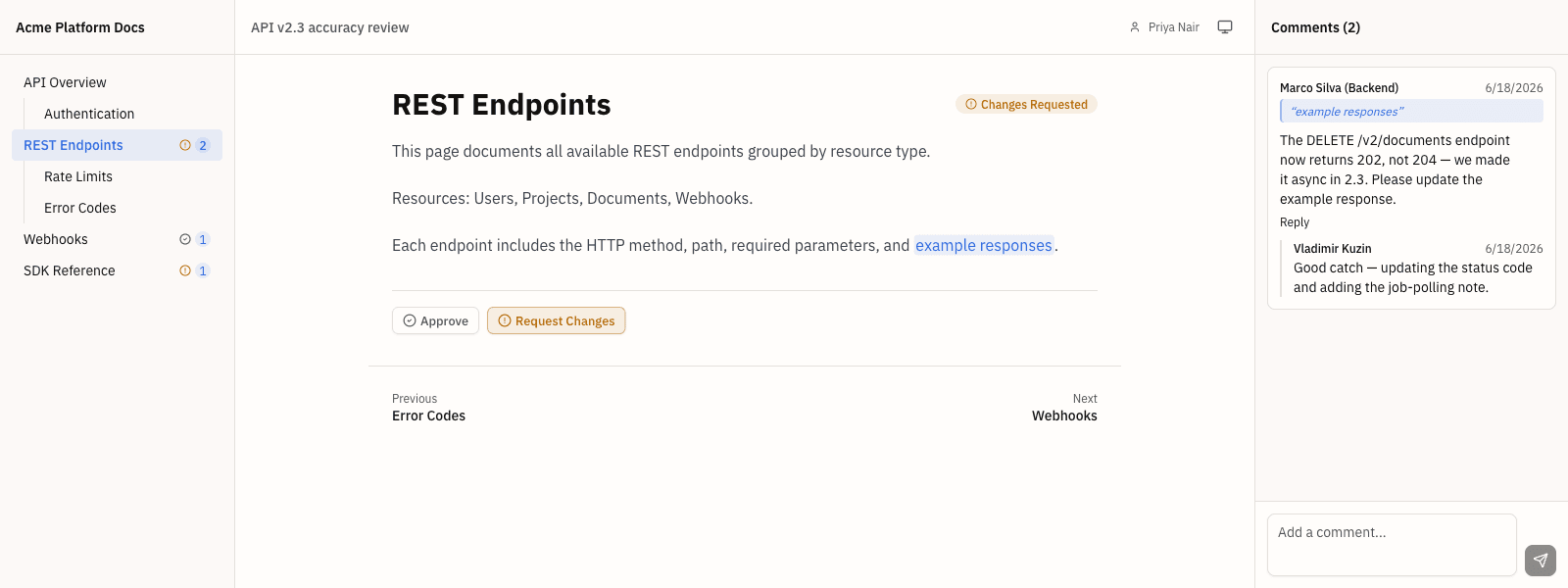
Topicary reviewers use a link with no account or per-seat charge; GitBook bills every SME reviewer at 12 dollars a month.
- Topicary: Unique review link per session. No account. No login. No per-reviewer charge. Included in Team.
- GitBook: Requires a GitBook account. At $12/user/month, adding 3 occasional SME reviewers costs $36/mo extra. That is the same per-user billing driving people off GitBook in the first place.
Content health and analytics
Topicary includes analytics, staleness flags, orphan detection, and reader feedback on all plans. GitBook shows page views on every plan and gates search analytics to paid plans. It tracks neither staleness nor orphans. Its Agent can mine support tickets for gaps (beta).
| GitBook | Topicary | |
|---|---|---|
| Page views | All plans | All plans |
| Search queries | Essential+ | All plans + zero-result gap detection |
| Content staleness | Not tracked | 30/90-day flags |
| Orphan detection | Not available | Unused components flagged |
| Reader feedback | Not built-in | Per-page feedback widget |
| Gaps from support tickets | GitBook Agent (beta) | Not available |
| AI analytics | AI Insights (Ultimate) | AI queries + crawler tracking (every plan) |
The DEV Community post-mortem and Reddit threads describe GitBook's search and performance degrading past 100 to 200 pages. Content health tooling helps prevent that scale ceiling.
LLM-ready output with structured authoring
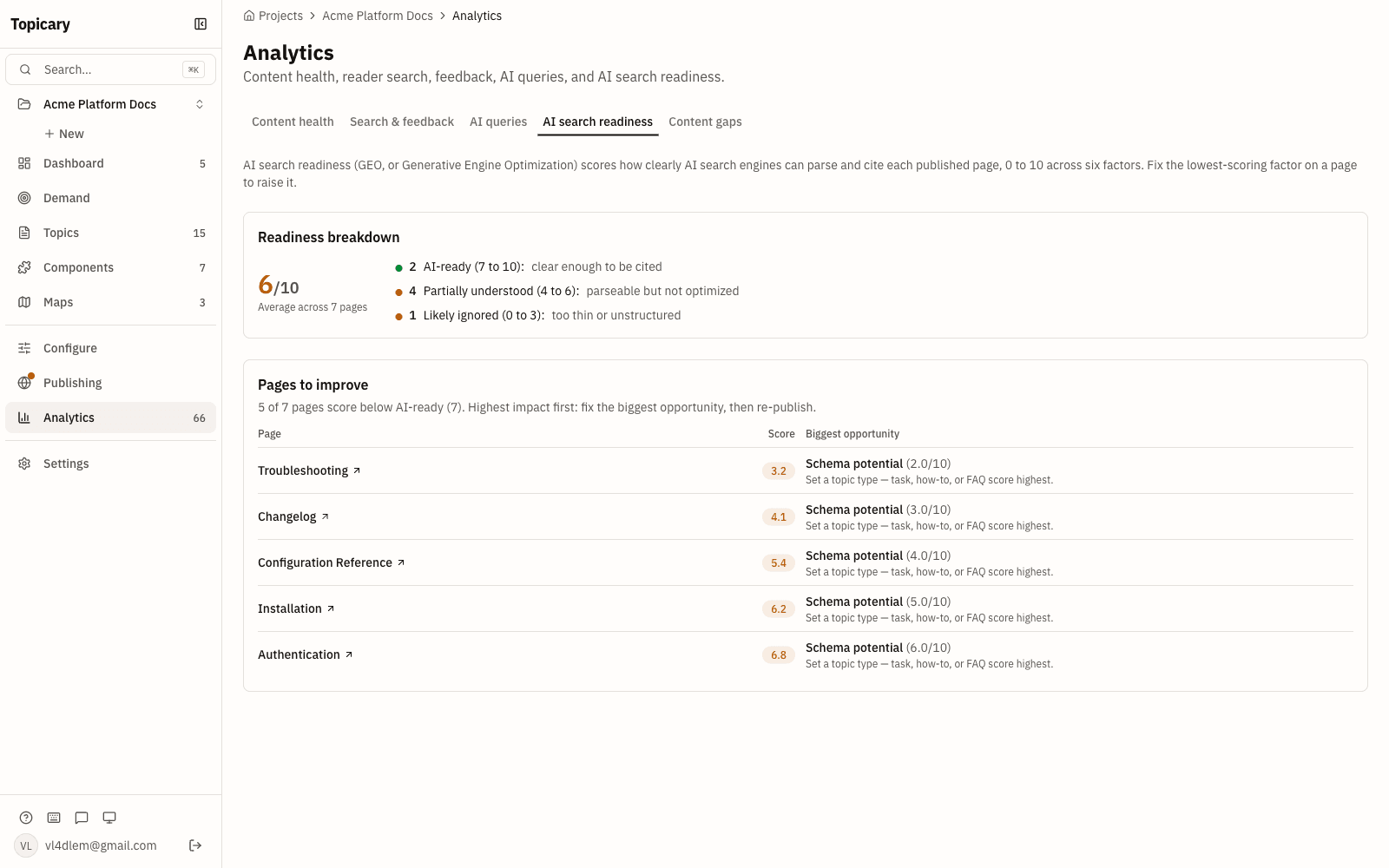
Both emit the same LLM output layer. Structure does not make AI answer better. The honest difference is that content is published resolved, so nothing downstream ingests unresolved variants. The content-health loop also puts stale and near-duplicate passages in front of the writer.
Both tools generate the same LLM-optimized output layer: llms.txt, llms-full.txt, .md URLs, sitemap.md, smart 404, ?ask= endpoints, MCP servers. On the published page, a modern LLM answers about as well from either. Structure on its own is not an answerability moat.
The difference is upstream, in what reaches that layer:
- GitBook: ships your pages as written. Conditional variants resolve in the reader's browser.
- Topicary: resolves components, filters conditions, and replaces variables before the Markdown is generated. The content-health loop flags stale topics, near-duplicate passages, and terminology drift for the writer to fix.
An AI agent reading a published site here gets one clean, current, internally consistent version. A reader gets the same. The alternative is raw source with every audience's variant included and no signal about what is out of date. That is a source-quality difference. It is not a claim that structure alone makes answers better.
GitBook pricing in 2026
GitBook charges per docs site plus per user. Essential costs $65 per site a month and Ultimate $249, billed annually, plus $12 for every user, including the first. Billed monthly, those become $79, $299 and $15. A Free plan is for individuals, and Enterprise is a custom quote.
| Plan | Per site, billed annually | Per site, billed monthly | Per user | AI credits included | What the plan adds |
|---|---|---|---|---|---|
| Free | $0 | $0 | For individuals | None | Block editor, GitHub/GitLab sync, API docs, MCP server |
| Essential | $65/mo | $79/mo | $12/mo annual, $15/mo monthly | $20 (2,000 credits) | Team collaboration, custom domain, analytics, redirects, reusable content, AI Assistant (Ask) |
| Ultimate | $249/mo | $299/mo | $12/mo annual, $15/mo monthly | $100 (10,000 credits) | AI Assistant chat, GitBook Agent, adaptive content, authenticated access, sections and groups |
| Enterprise | Custom | Custom | Custom | Custom | SAML SSO, migration service, custom contract, IP allowlisting for Git Sync |
GitBook's own calculator prices 1 Ultimate site with 1 user at $261 a month billed annually ($3,132 a year) and $314 billed monthly. On annual billing, extra AI credits come in packs, from 5,000 credits for $47.50 a month to 40,000 for $300.
What GitBook costs at your team size
This is the part most GitBook refugees came for. GitBook's bill grows with every site and every user. Topicary prices per plan with a flat author limit, so a price hike does not scale with headcount.
| Team size | GitBook Essential (1 site) | Topicary | Annual difference |
|---|---|---|---|
| 1 writer | $77/mo ($65 + $12) | $0/mo (Free: 1 author, 50 topics) | $924/yr saved on Topicary |
| 3 writers | $101/mo ($65 + $12 x 3) | $79/mo (Pro: 3 authors, 3 sites) | $264/yr saved on Topicary |
| 5 writers | $125/mo ($65 + $12 x 5) | $149/mo (Team: 10 authors, 10 sites) | GitBook is $288/yr less |
| 7 writers | $149/mo ($65 + $12 x 7) | $149/mo (Team) | Even |
| 10 writers | $185/mo ($65 + $12 x 10) | $149/mo (Team) | $432/yr saved on Topicary |
GitBook pricing: gitbook.com/pricing, checked October 26, 2026 (annual billing in the table). Above 10 authors, Topicary moves to the custom-priced Business plan. Topicary pricing: topicary.com.
That table is the single-site case, which is GitBook's best matchup. Run more than one docs site and GitBook's per-site base multiplies. (The $12/user fee does not multiply. It is billed once across your organization, not per site.) A team of 10 across 3 sites:
| 10 writers, 3 sites | GitBook Essential | GitBook Ultimate | Topicary Team |
|---|---|---|---|
| Monthly | $315/mo | $867/mo | $149/mo flat |
The Team plan includes up to 10 sites at the same flat $149. Adding sites does not move the bill, and neither does adding seats. That is the difference that matters. GitBook scales cost on two axes: sites x users. Here neither limit applies until you outgrow the plan.
At 4 to 6 writers with a single site, GitBook Essential costs less. At 7 the two cost the same. If your docs are also simple, a static generator may be cheaper still. At 8 or more writers, the flat Team plan ($149/mo for 10 writers) is cheaper than GitBook. It also stops the per-seat creep. Running docs solo or on a small team? Here is how it fits a team of one to ten.
The price comparison is incomplete without the feature gap. Every plan includes conditional content and PDF publishing, Free included. Team adds variable sets, 7-format import, and SME review. On GitBook, audience filtering requires Ultimate ($249/site/mo), and every reviewer is a $12 seat. As of October 2026, the capabilities GitBook lacks outright are publish-time conditions, named variable sets, and DITA/Flare import. Everything else is a difference of depth, not presence.
A note on billing history: GitBook moved from a generous free tier to per-site + per-user pricing. That locked out longtime free users. Reviewers cite continued billing after cancellation and difficulty getting refunds. Capterra reviewers describe "drastic pricing shifts." A widely shared DEV Community post-mortem walks through one team's decision to leave. This is the change driving the current migration wave.
For a wider survey of documentation tools, see the technical writing software comparison.
Migration from GitBook to Topicary
GitBook does not have a direct Markdown export button. One DEV Community post-mortem described "getting your content out is harder than getting it in." Here is the calm version.
If you have GitHub sync enabled (most likely)
- Your GitBook content already exists as Markdown in a GitHub repo
- Clone the repo locally
- Drag the folder onto the import dialog; format auto-detection picks up Markdown files
- What transfers: headings, paragraphs, lists, code blocks, tables, images, inline links
- What does not: GitBook-specific blocks (hints, tabs, API playgrounds) import as raw text. Page hierarchy must be recreated as maps.
If you do not have GitHub sync
- Enable it temporarily; GitBook writes content to a repo as Markdown
- Follow the steps above
- Alternative: copy content page-by-page. GitBook pages paste into the editor with basic formatting preserved
What you gain after import
After import, create components from repeated content (select text → "Save as component"). Add conditions for audience-specific content, publish to a branded PDF, and define variable sets on Team. GitBook had no publish-time conditions or named variable sets.
Estimated effort: A GitBook space with 30 to 50 pages takes 1 to 2 hours for content transfer. Map hierarchy setup adds another 1 to 2 hours. There is no structured authoring metadata to recreate. You are building that layer for the first time. For migration from more structured tools, see Topicary vs Paligo, Topicary vs MadCap Flare, or the Flare migration guide.